
Assessment Summary
0 of 40 Questions completed
Questions:
Information

You have already completed the assessment before. Hence you can not start it again.
Assessment is loading…
You must sign in or sign up to start the assessment.
You must first complete the following:
Results
Results
0 of 40 Questions answered correctly
Your time:
Time has elapsed
You have reached 0 of 0 point(s), (0)
Earned Point(s): 0 of 0, (0)
0 Essay(s) Pending (Possible Point(s): 0)
Categories
- Not categorized 0%
- 1
- 2
- 3
- 4
- 5
- 6
- 7
- 8
- 9
- 10
- 11
- 12
- 13
- 14
- 15
- 16
- 17
- 18
- 19
- 20
- 21
- 22
- 23
- 24
- 25
- 26
- 27
- 28
- 29
- 30
- 31
- 32
- 33
- 34
- 35
- 36
- 37
- 38
- 39
- 40
- Current
- Review
- Answered
- Correct
- Incorrect
-
Question 1 of 40
1. Question
Q1. You would like darken the title shown in Figure 1. How do you perform it?
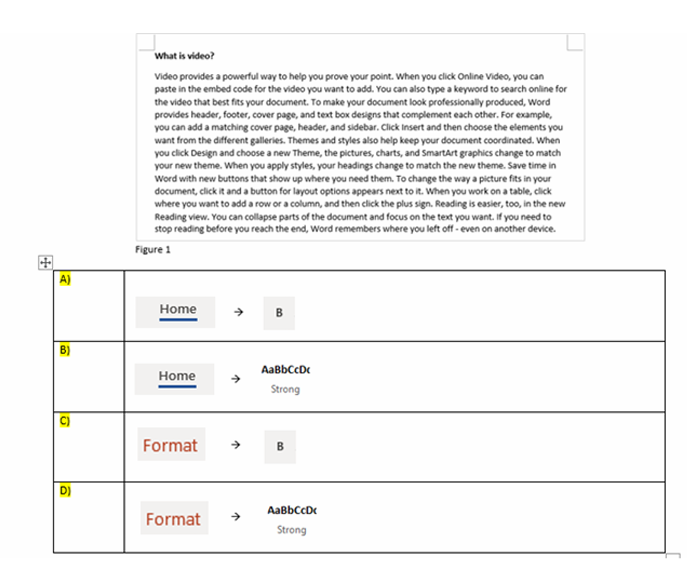
-
Question 2 of 40
2. Question
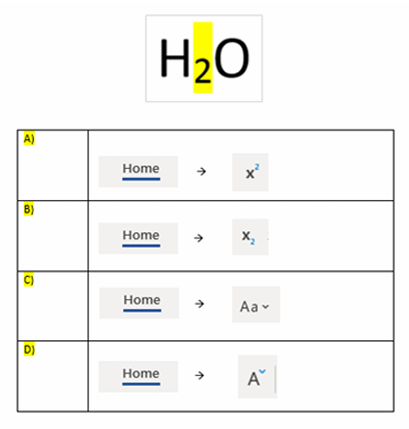
Q2. How do you create the highlight yellow character?
-
Question 3 of 40
3. Question
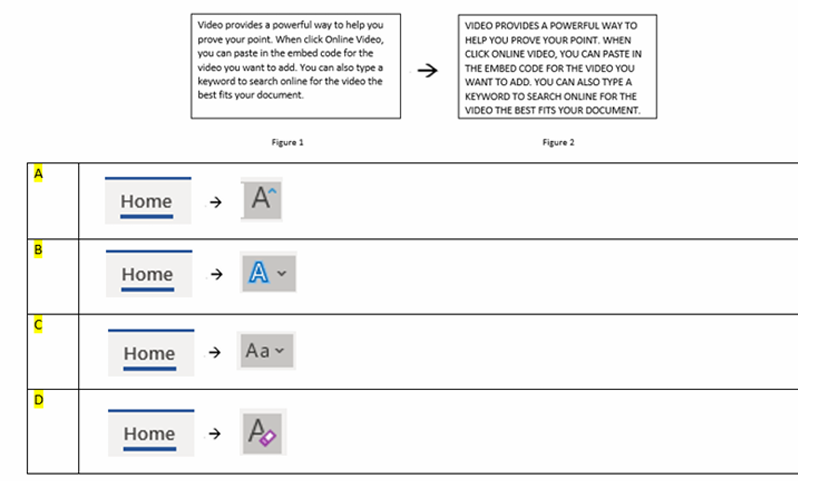
Q3. Your document displayed in Figure 1 are in caps and lower case. How do change the entire paragraph to depict Figure 2?
-
Question 4 of 40
4. Question
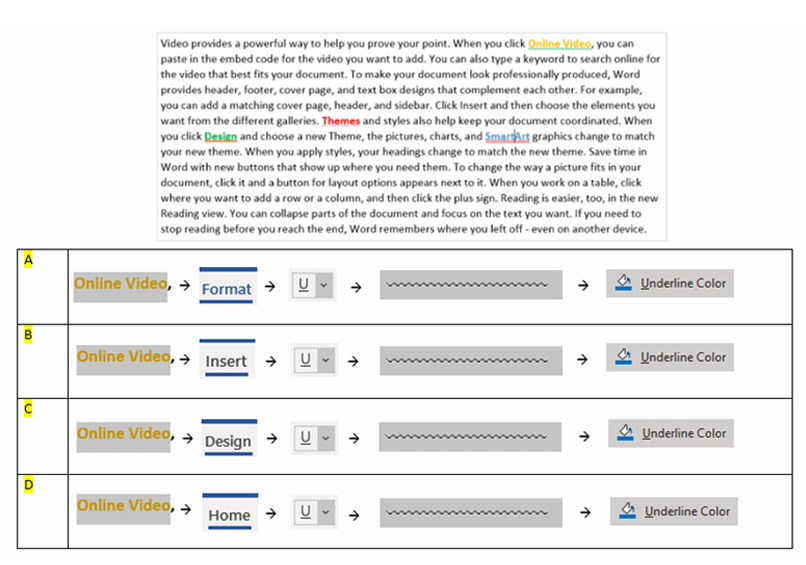
Q4. As you can see the coloured words in paragraph below, has fancy underline. How do create them?
-
Question 5 of 40
5. Question
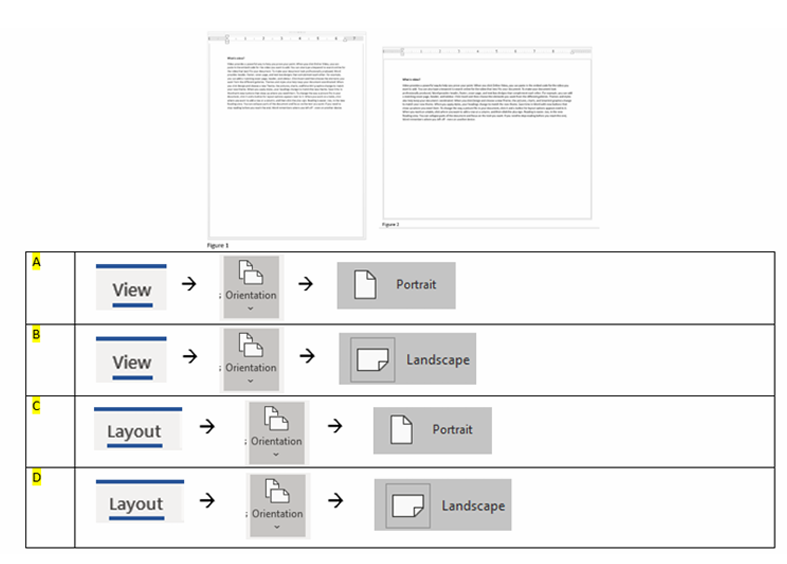
Q5. Your current document shown in Figure 1 will be printed vertically. How do you print it horizontally as shown in Figure 2?
-
Question 6 of 40
6. Question
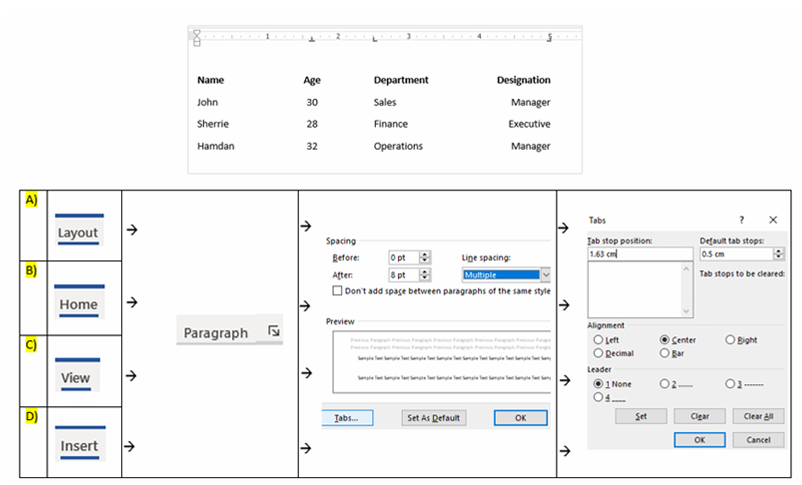
Q6. You document contains 4 columns. You would like align them as shown in the diagram below. How do you align these text?
-
Question 7 of 40
7. Question
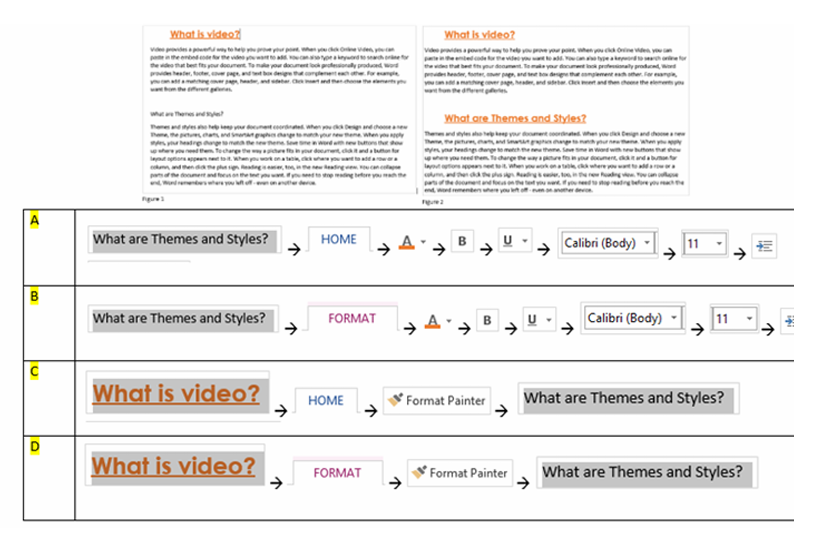
Q7. You would like the formatting of “”What is video?”” to be applied to the second title “”What are Themes and Styles?”” Which is the best method to achieve it?
-
Question 8 of 40
8. Question
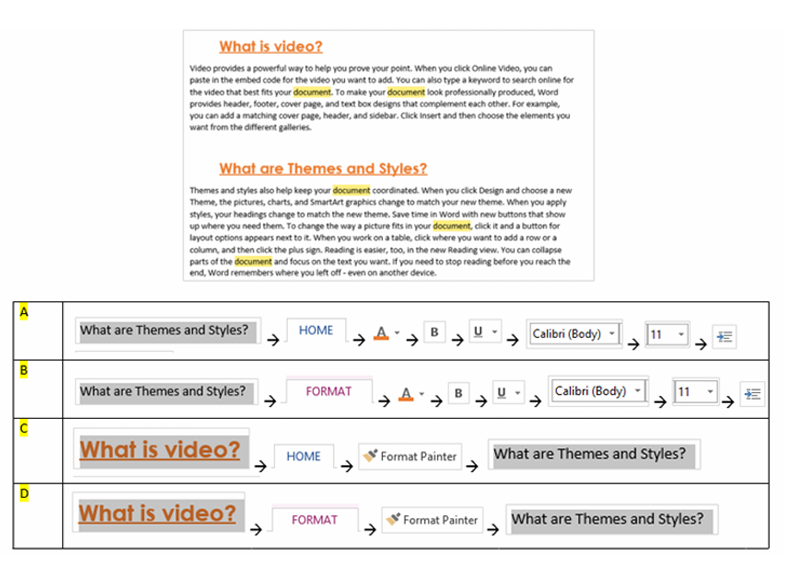
Q8. You would like to change the word “”document”” as highlighted in screenshot below to “”text””. Which is the fastest method to achieve it?
-
Question 9 of 40
9. Question
Q9. The paragraph below shows that it start ¾” away from the margin. How do you create this?
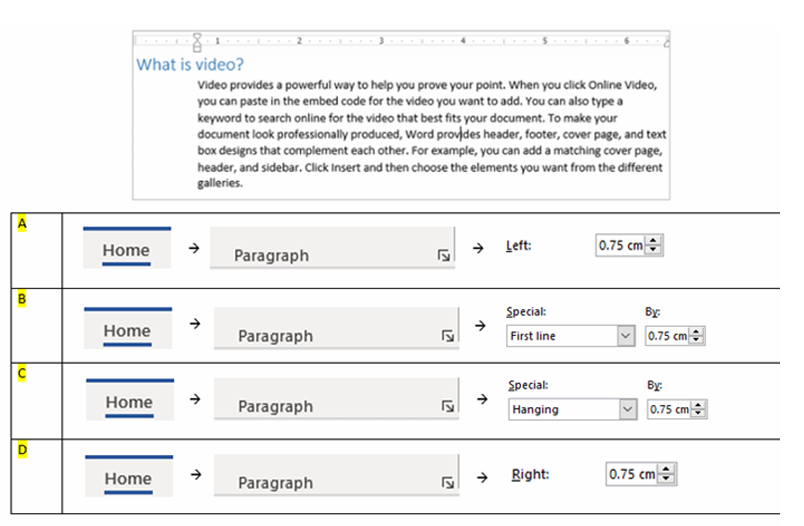
-
Question 10 of 40
10. Question
Q10. In the picture below, you noticed the 2 titles have large spacing applied at the top and bottom of the titles. How do you create these gaps?
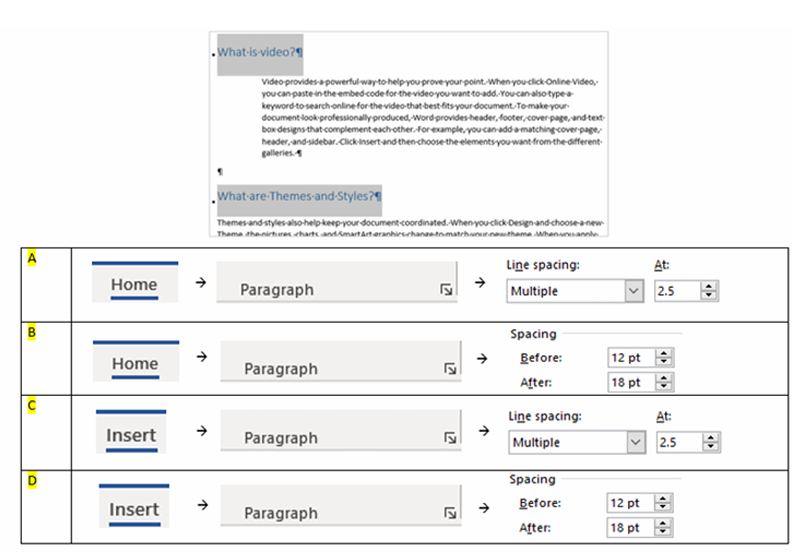
-
Question 11 of 40
11. Question
Q11. The document below consist of 2 pages. How do you create the content on the left page (boxed in RED)?
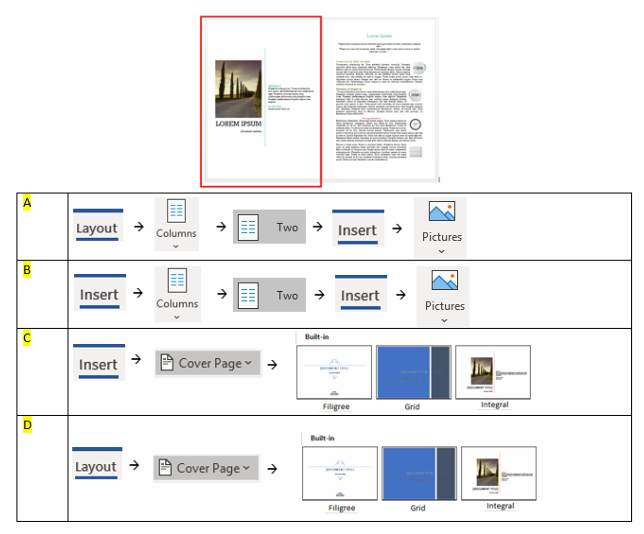
-
Question 12 of 40
12. Question
Q12. How do you create the red “DO NOT COPY”, as shown in the document below?\
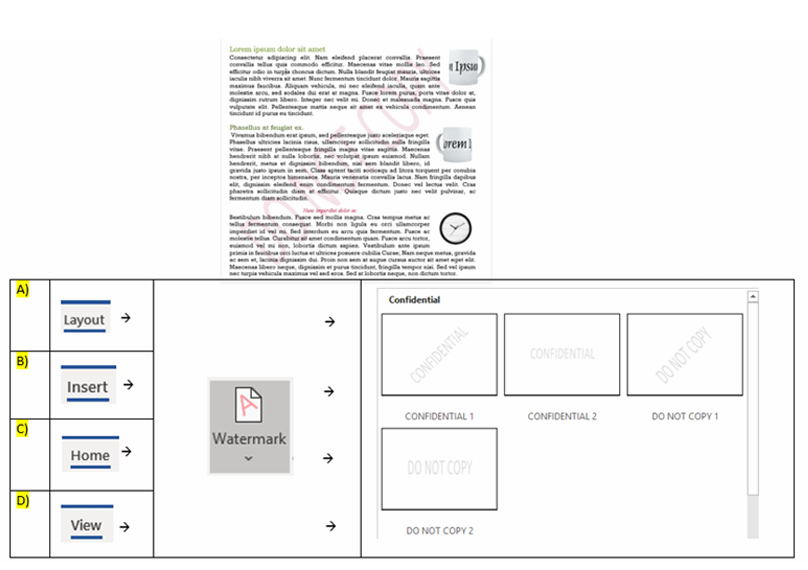
-
Question 13 of 40
13. Question
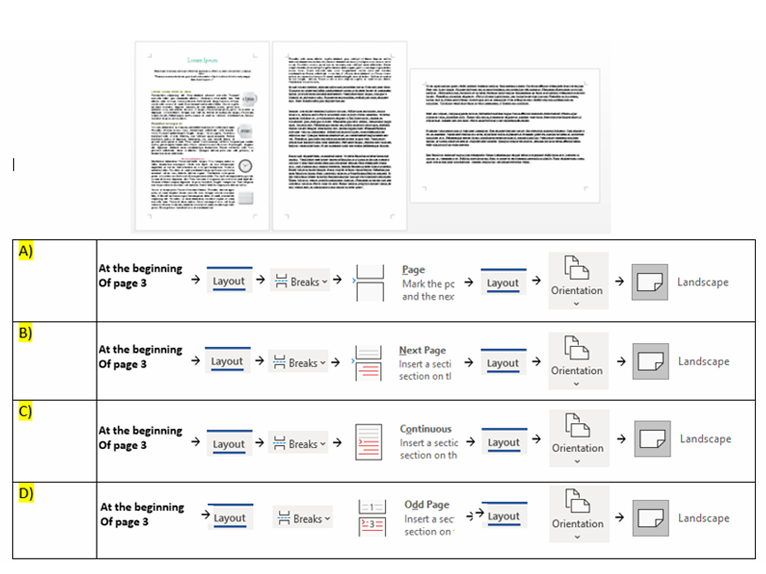
Q13. In your document below consist of 3 pages. How do you set the 3rd page to landscape orientation?
-
Question 14 of 40
14. Question
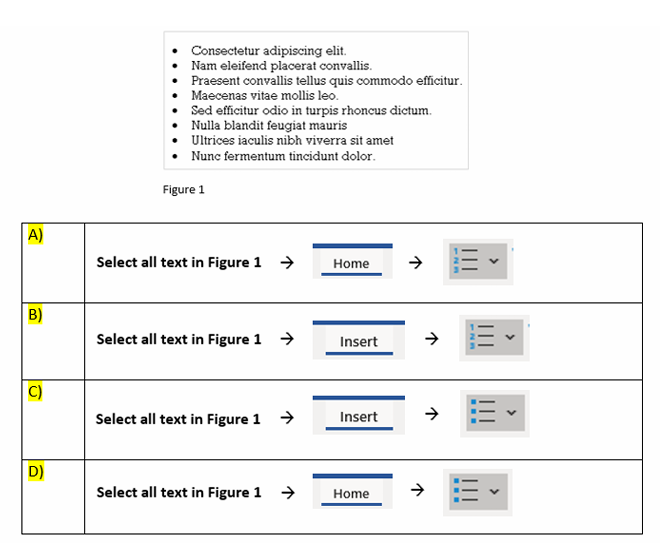
Q14. You document requires you to list down items in a list. How do you create the list as shown below?
-
Question 15 of 40
15. Question
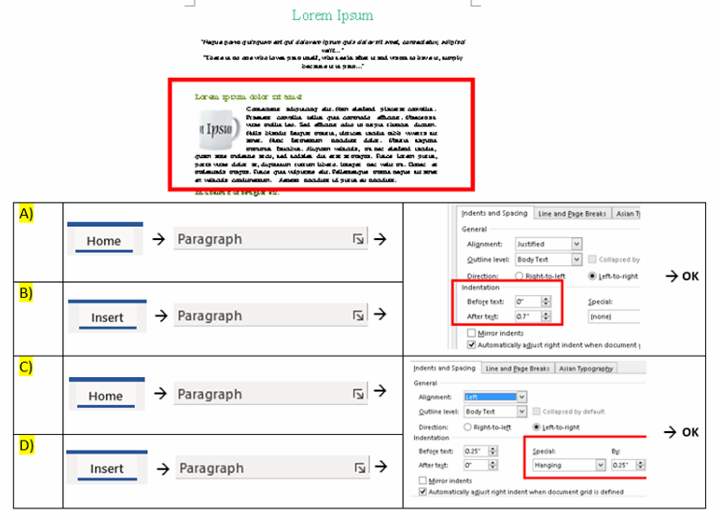
Q15. How do you create the paragraph boxed in RED for the 1-page document below?
-
Question 16 of 40
16. Question
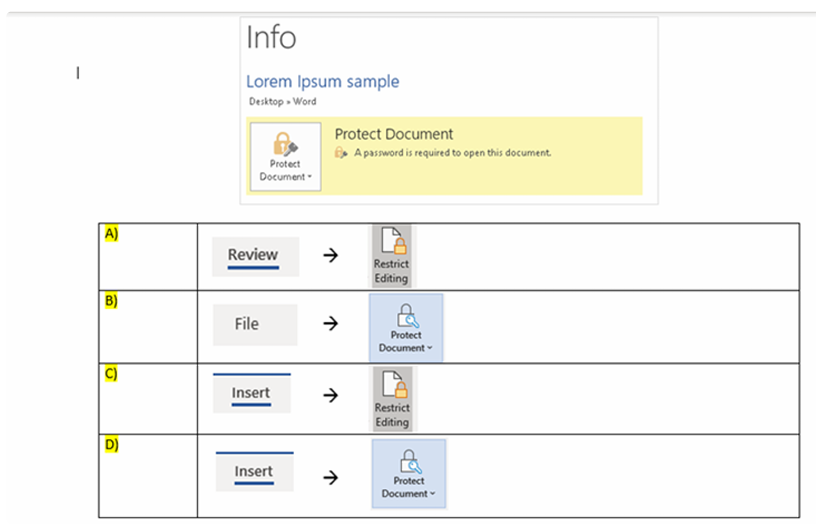
Q16. You have a document which is placed on a shared drive. You only allow users with password access to retrieve and edit the file. How do you set file password for your file?
-
Question 17 of 40
17. Question
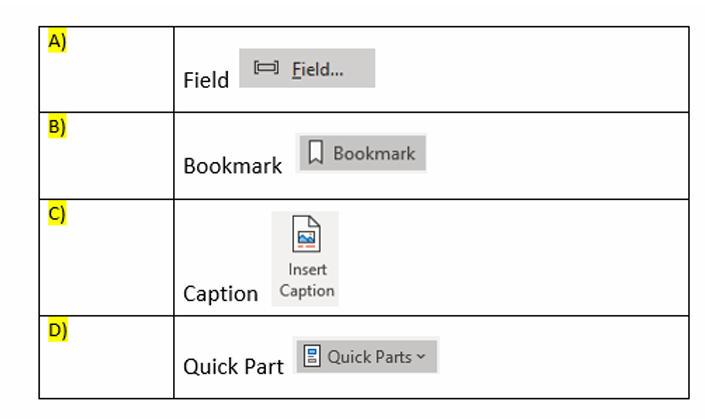
Q17. Which of the following is a hidden code that tells Word to insert specific information?
-
Question 18 of 40
18. Question
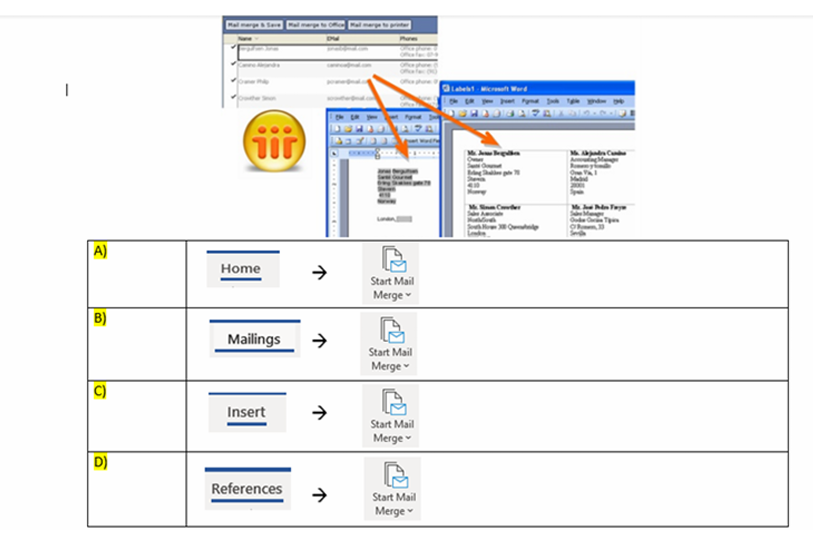
Q18. As a HR personnel, you would like to send offer letters to a couple of successful candidates. Instead of doing it manually, changing each candidate’s details for each letter. Which is the fastest and best method to do this?
-
Question 19 of 40
19. Question
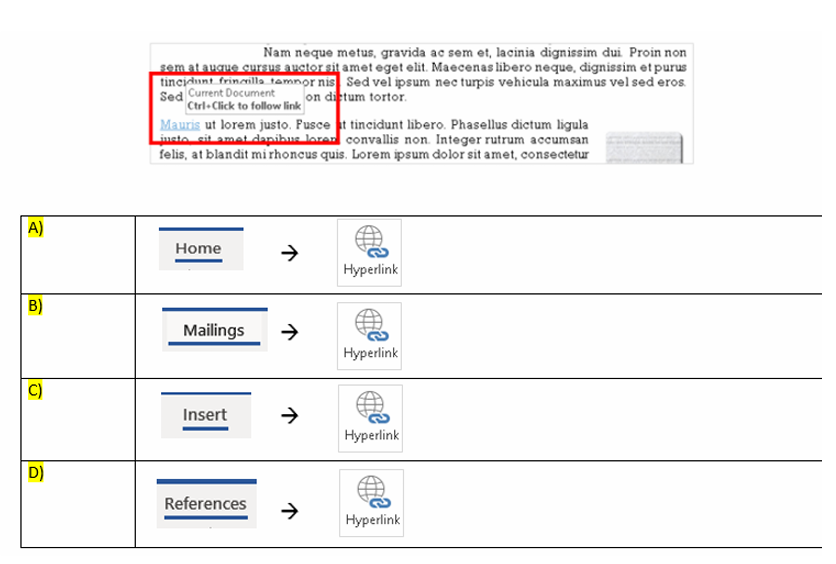
Q19. How do you create the blue text “Mauris” as shown in the picture below?
-
Question 20 of 40
20. Question
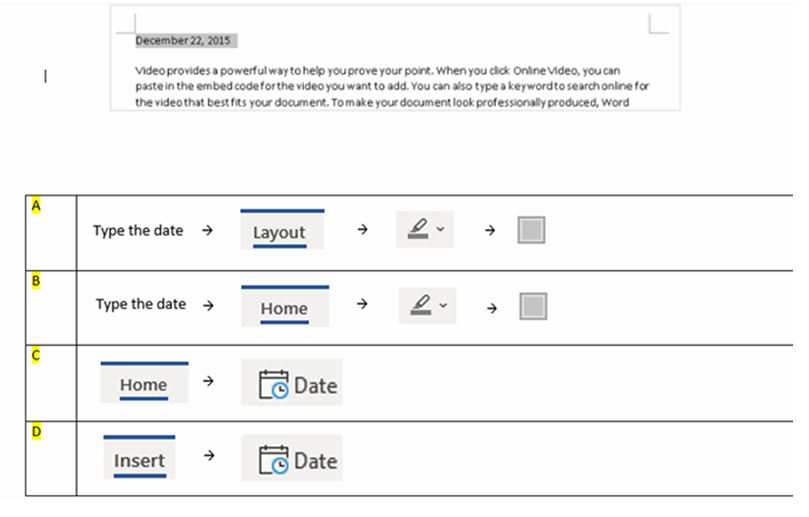
Q20. In the picture below, the date is highlighted in grey. How do you create a date as shown below?
-
Question 21 of 40
21. Question
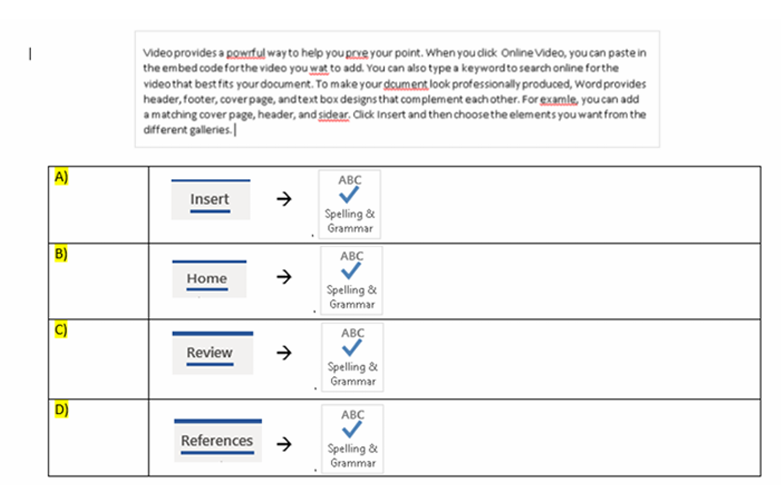
Q21. In the document below, you noticed some there are spelling errors on. How do you check the spelling to ensure that this document is free of spelling errors?
-
Question 22 of 40
22. Question
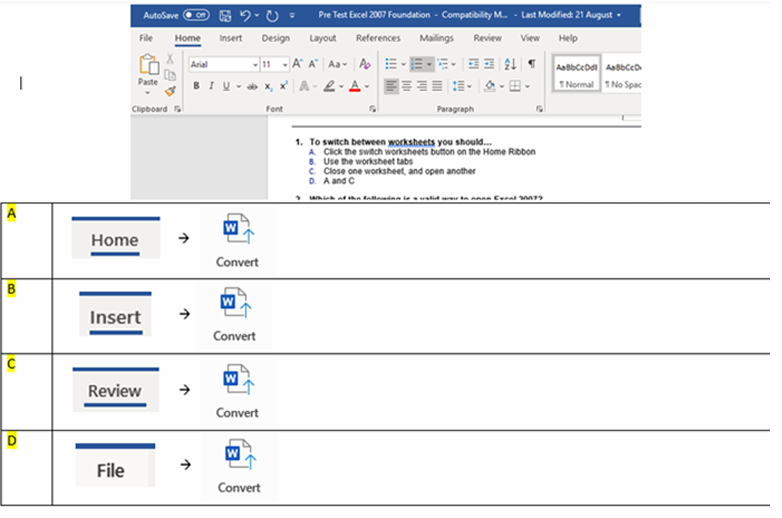
Q22. On the title bar of your current document shows [Compatibility Mode]. This tells you that you document is not saved in the latest format/version. How do ensure your document format is saved on the latest version?
-
Question 23 of 40
23. Question
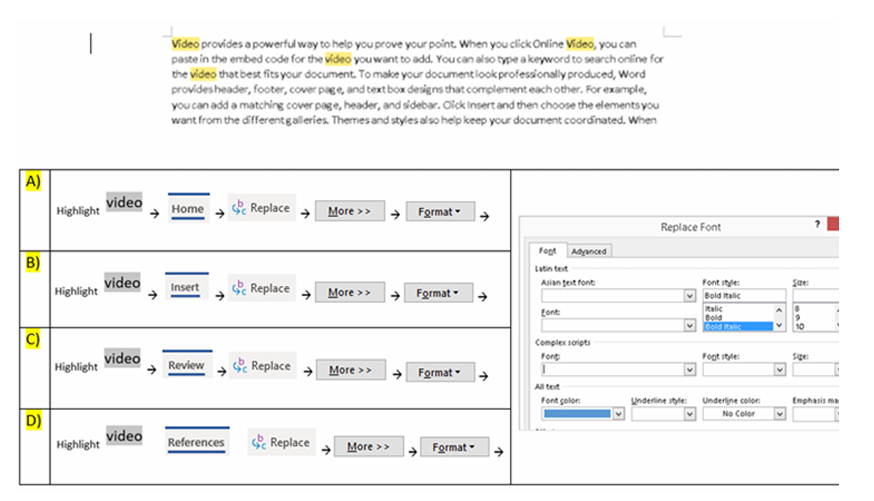
Q23. You would like to format the highlighted word “video” in the document below, to bold, italic and blue in color. Which is the fastest way to do this?
-
Question 24 of 40
24. Question
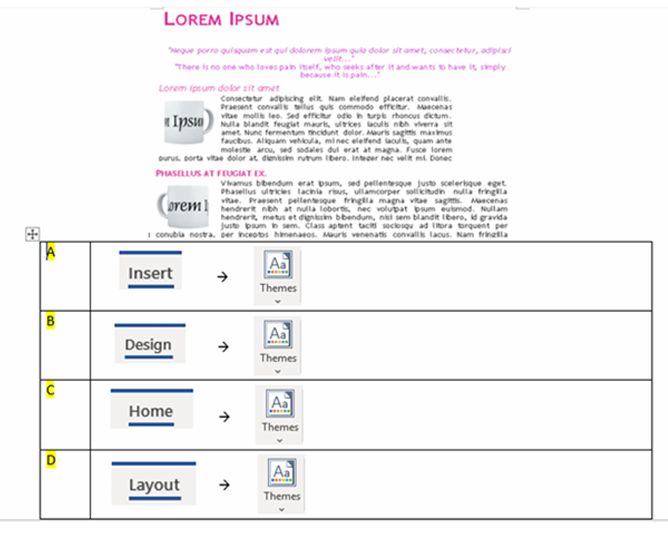
Q24. How would you ensure that the fonts, colours and effects are consistent throughout the entire document
-
Question 25 of 40
25. Question
Q25. The data in the picture below is nicely aligned. How do you align all columns’ data as shown in the picture below?
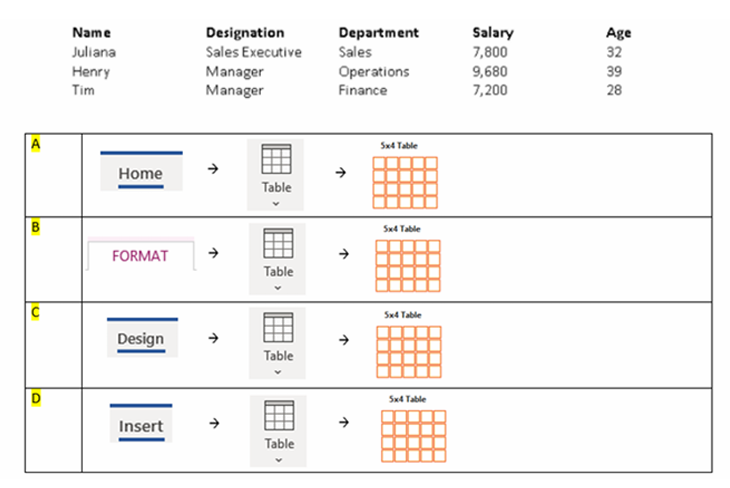
-
Question 26 of 40
26. Question
Q26. How do you align the picture of Figure 1 to depict in Figure 2?
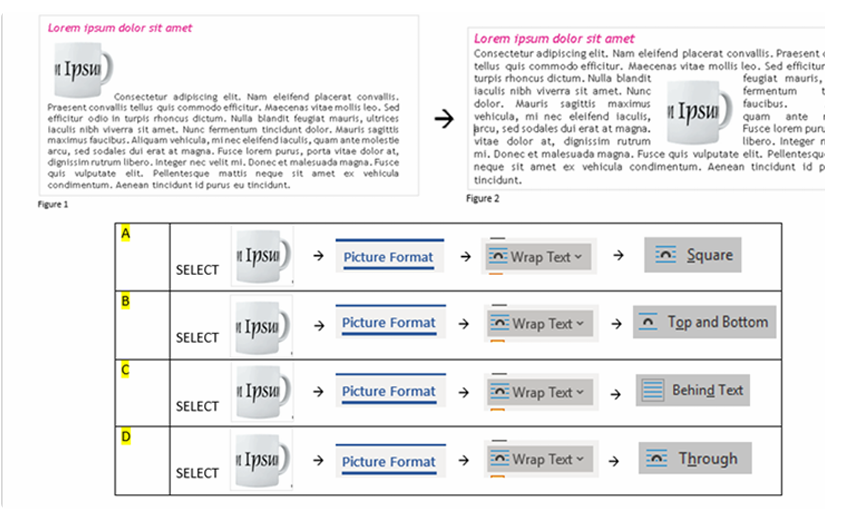
-
Question 27 of 40
27. Question
Q27. How do you create the table of content as shown in the picture below?
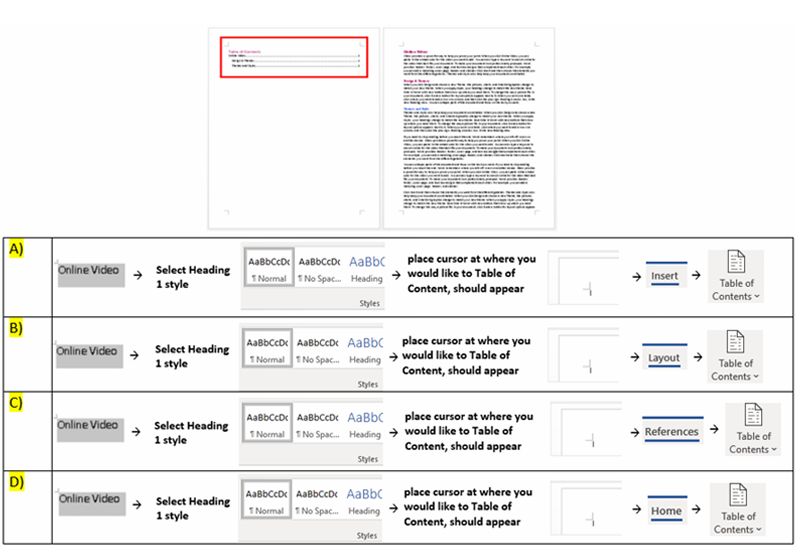
-
Question 28 of 40
28. Question
Q28. How do you create the diagram as shown below?
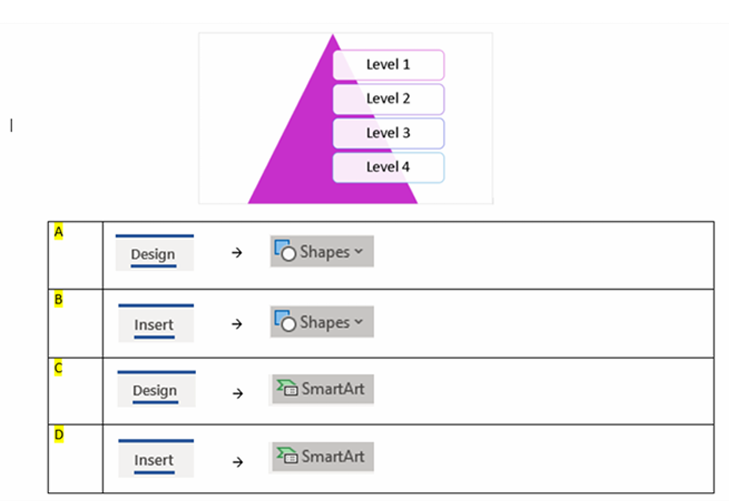
-
Question 29 of 40
29. Question
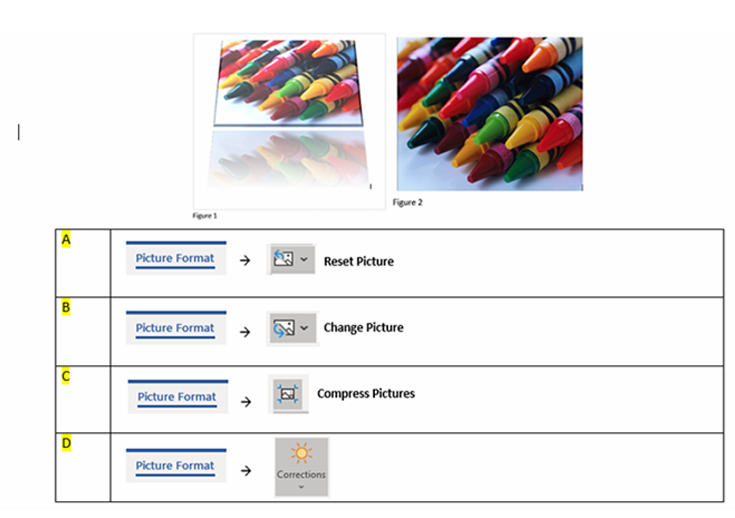
Q29. You have applied some effects to the picture shown Figure 1. How do you remove all the effects as shown in Figure 2?
-
Question 30 of 40
30. Question
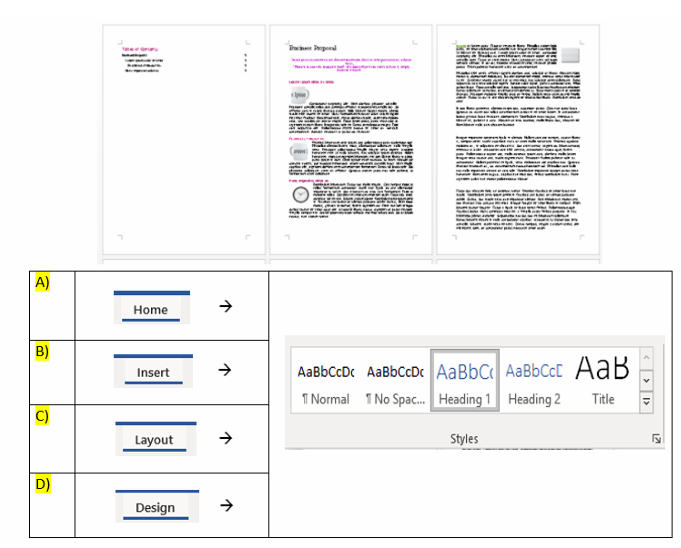
Q30. You have prepared your business proposal. How do you ensure that the entire document’s formatting is consistent?
-
Question 31 of 40
31. Question
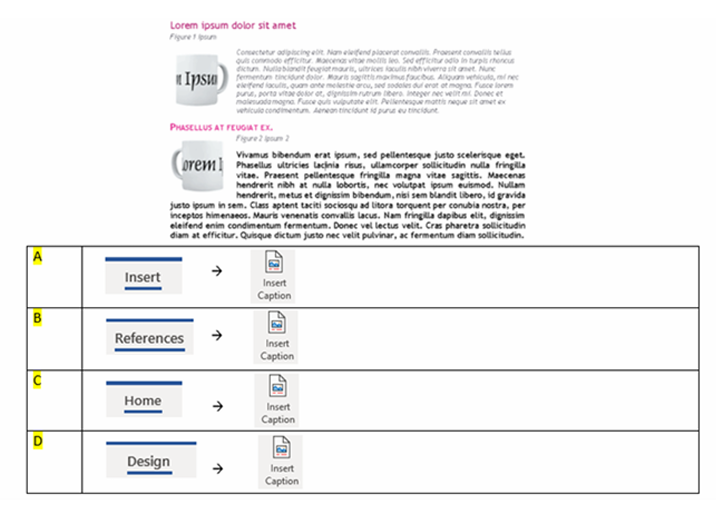
Q31. The picture shows labels “Figure 1” and “Figure 2”. How do you create the labels boxed up in red as shown in the picture below?
-
Question 32 of 40
32. Question
-
Question 33 of 40
33. Question
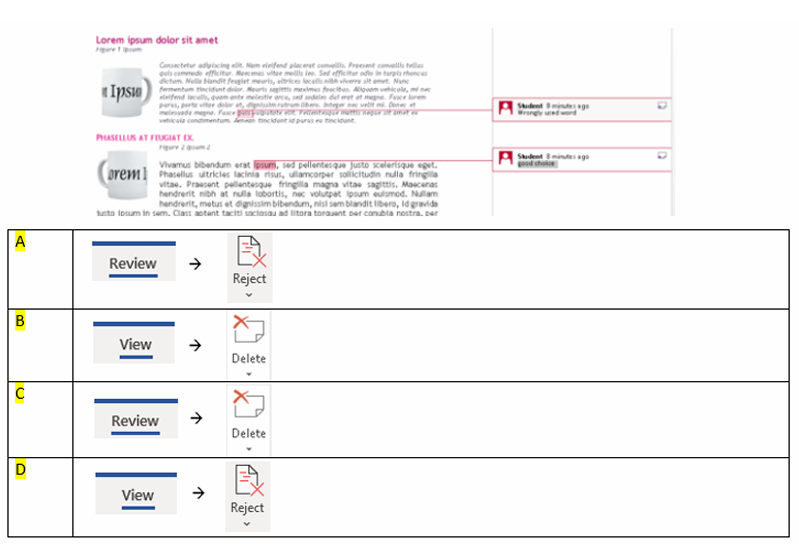
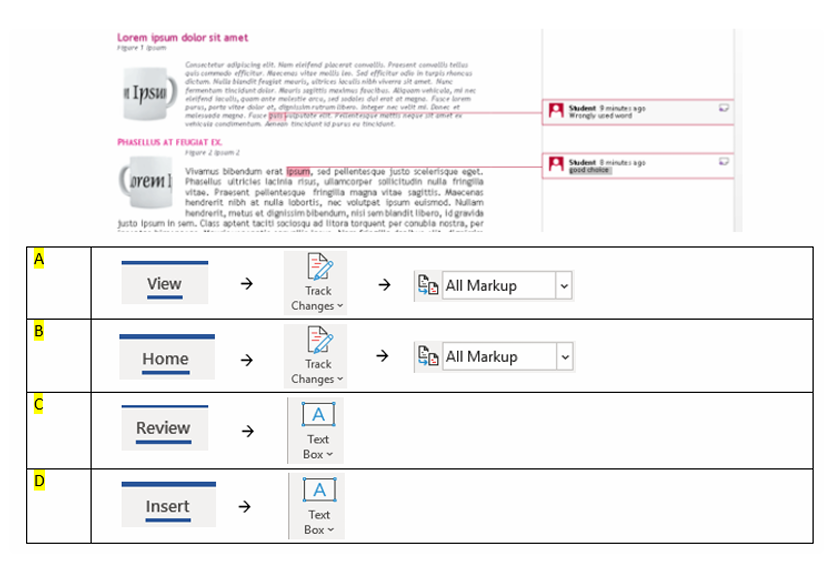
Q33. There are two remarks shown in the picture below. How do you create them?
-
Question 34 of 40
34. Question
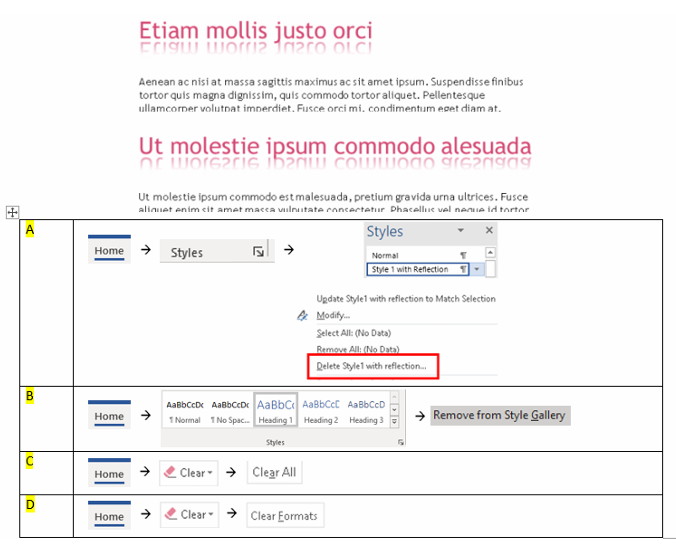
Q34. You have created two title headings in your document. How do you remove the formatting for these title headings?
-
Question 35 of 40
35. Question
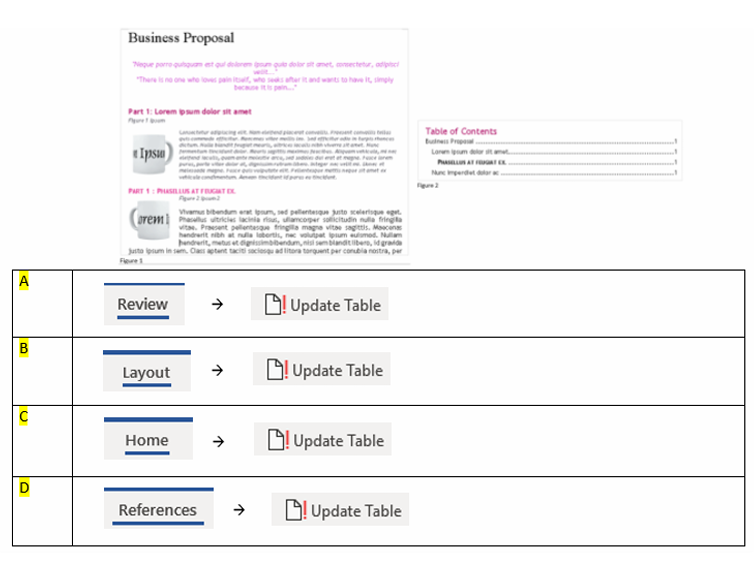
Q35. You have updated the titles in your business proposal as shown in Figure 1. You need the table of contents updated to reflect the changes as shown in Figure 2. How do you do this?
-
Question 36 of 40
36. Question
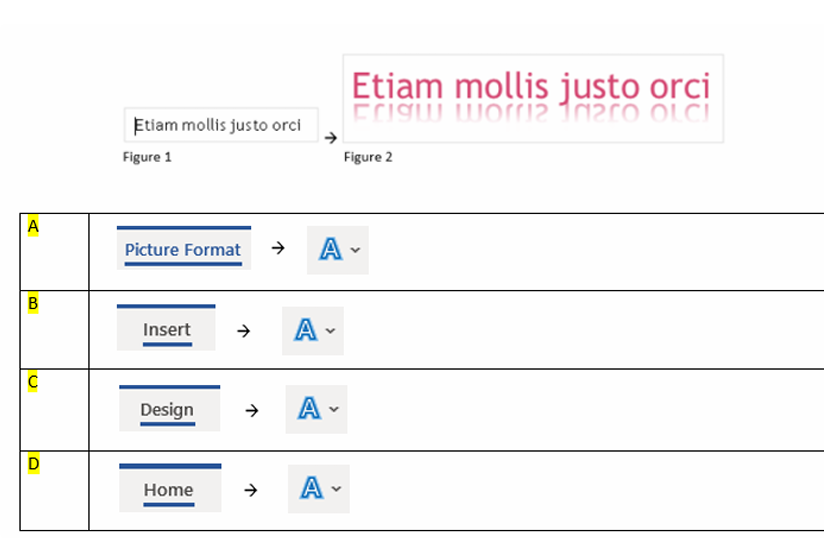
Q36. How do you convert the text as shown in Figure 1 to Figure 2?
-
Question 37 of 40
37. Question
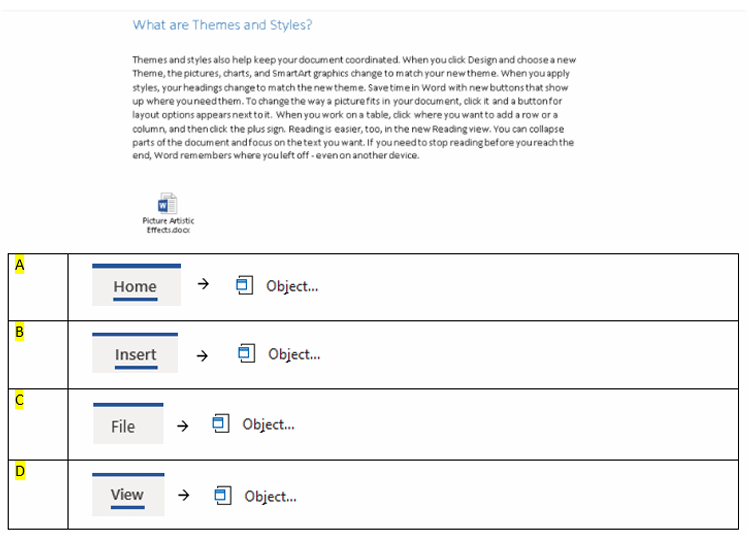
Q37. There is an icon shown in your proposal below. How do you create this icon?
-
Question 38 of 40
38. Question
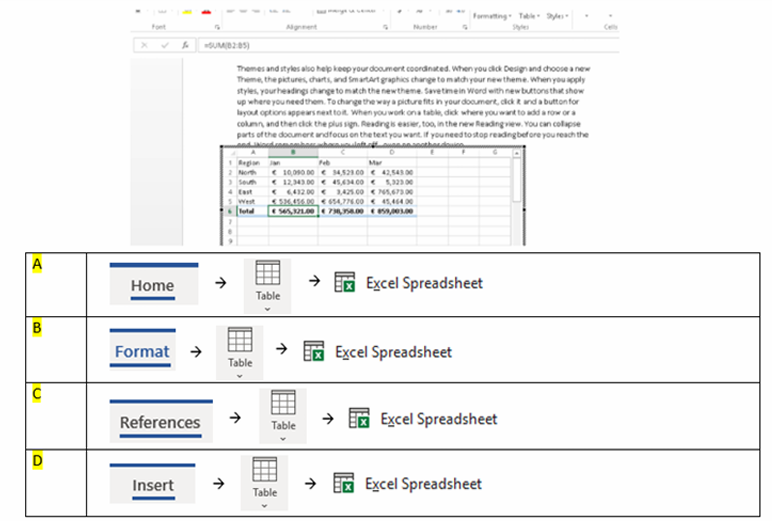
Q38. How do you create formulas in your word document?
-
Question 39 of 40
39. Question
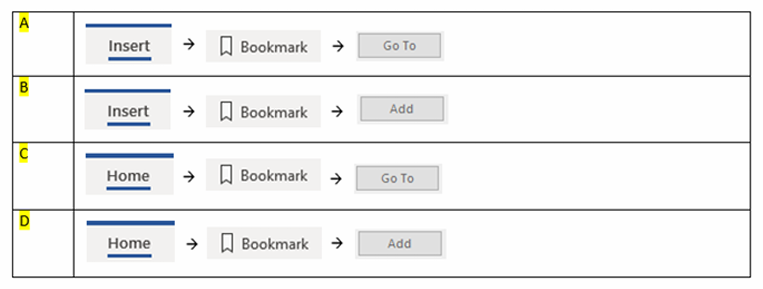
Q39. There are a couple of bookmarks in this document. How do you create these bookmarks?
-
Question 40 of 40
40. Question
Q40. How do you remove all remarks shown in the picture below?