
Assessment Summary
0 of 40 Questions completed
Questions:
Information

You have already completed the assessment before. Hence you can not start it again.
Assessment is loading…
You must sign in or sign up to start the assessment.
You must first complete the following:
Results
Results
0 of 40 Questions answered correctly
Your time:
Time has elapsed
You have reached 0 of 0 point(s), (0)
Earned Point(s): 0 of 0, (0)
0 Essay(s) Pending (Possible Point(s): 0)
Categories
- Not categorized 0%

- 1
- 2
- 3
- 4
- 5
- 6
- 7
- 8
- 9
- 10
- 11
- 12
- 13
- 14
- 15
- 16
- 17
- 18
- 19
- 20
- 21
- 22
- 23
- 24
- 25
- 26
- 27
- 28
- 29
- 30
- 31
- 32
- 33
- 34
- 35
- 36
- 37
- 38
- 39
- 40
- Current
- Review
- Answered
- Correct
- Incorrect
-
Question 1 of 40
1. Question
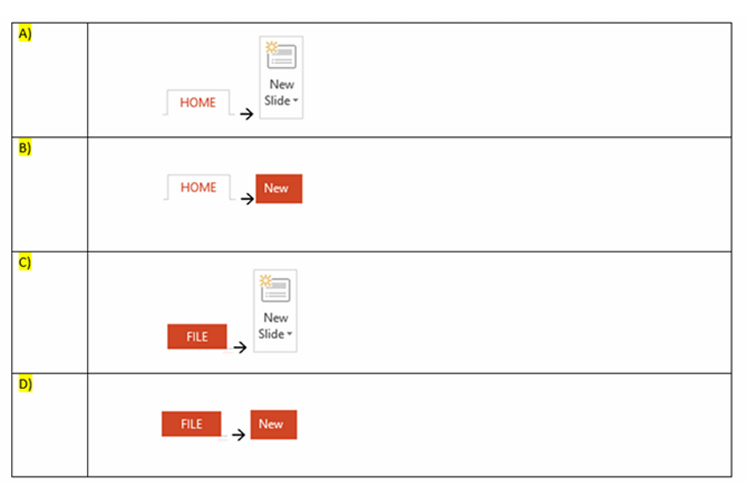
Q1. In your current presentation, you would like to insert a new slide in your current assessment. Which of the following methods will allow you insert a new slide?
-
Question 2 of 40
2. Question
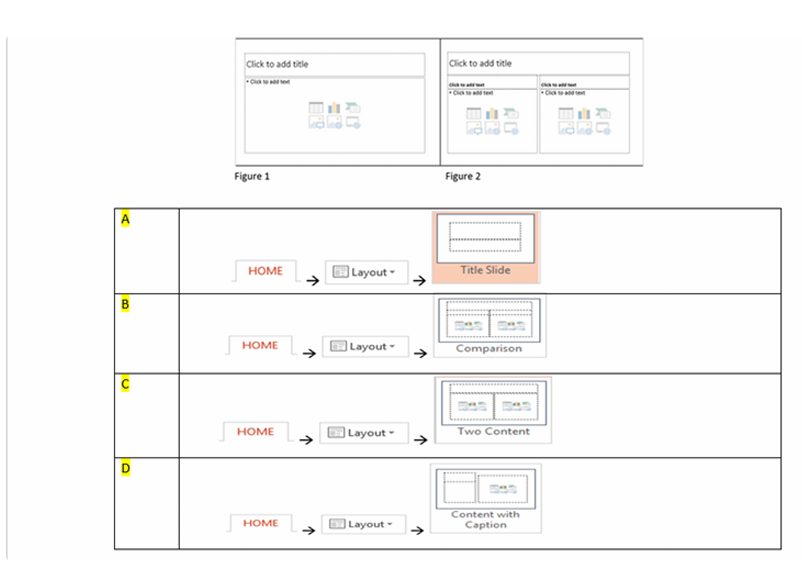
Q2. How do you change the slide layout of Picture 1 to the layout as shown in Picture 2?
-
Question 3 of 40
3. Question
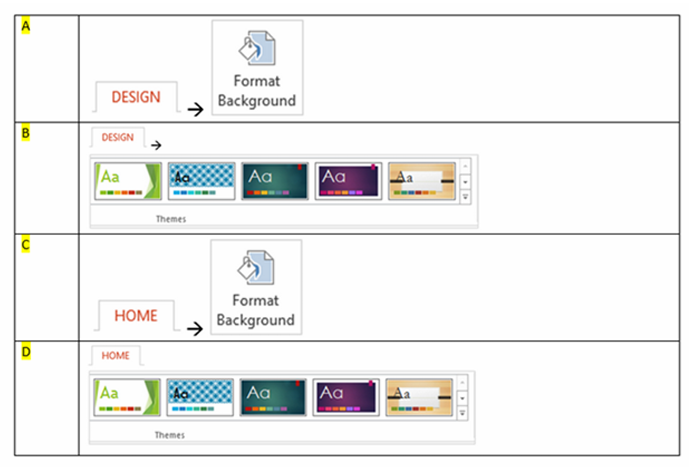
Q3. You have a presentation with 10 slides. You want to quickly format the presentation with a background design. Which of the following methods would you use?
-
Question 4 of 40
4. Question
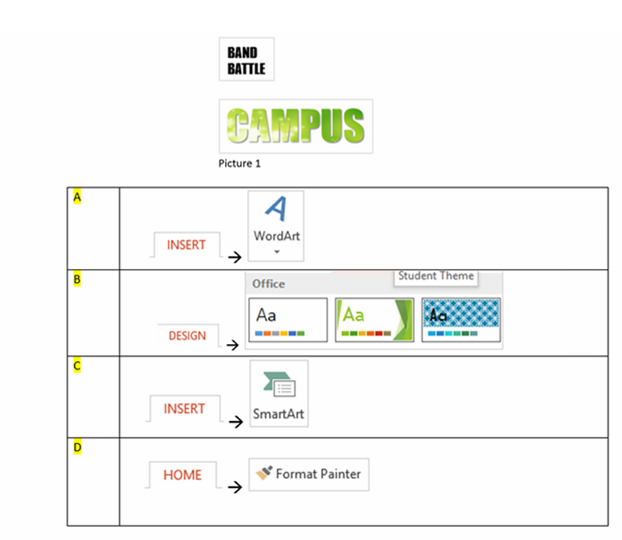
Q4. You would like to format the word “”BAND BATTLE”” as shown in the picture below, to the formatting shown in in Picture 1. Which of the answers below, would be the fastest method?
-
Question 5 of 40
5. Question
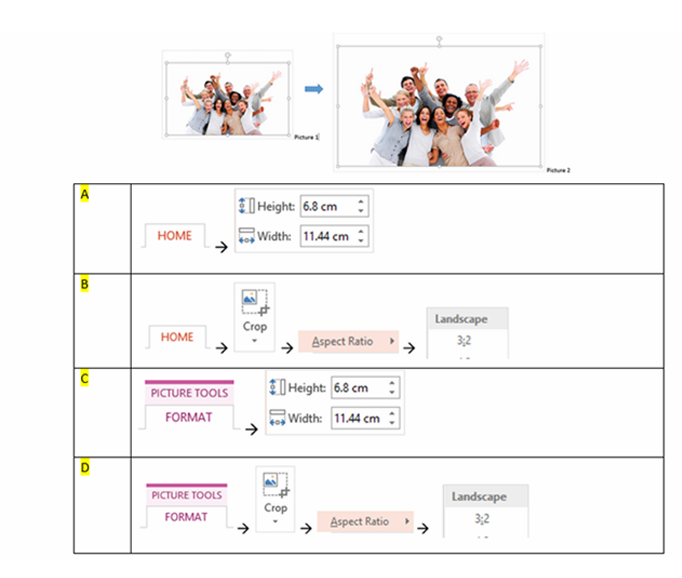
Q5. How do you enlarge Picture 1, so that it is as big as Picture 2 and doesn’t not look distorted?
-
Question 6 of 40
6. Question
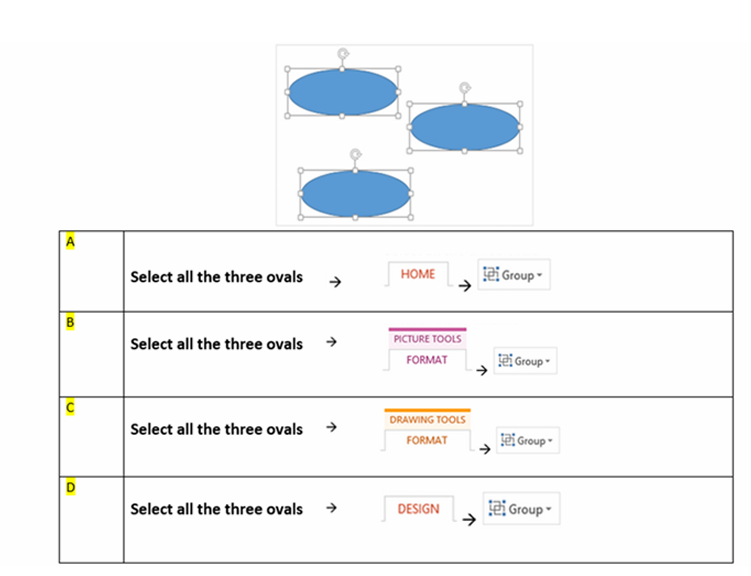
Q6. There are three oval shapes in slides. You would like to group all three oval shapes together. Which of the following answer will allow you to achieve that?
-
Question 7 of 40
7. Question
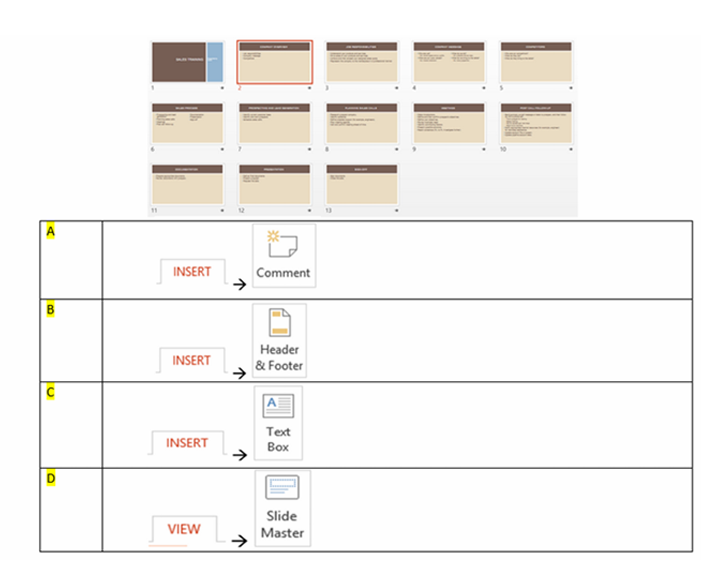
Q7. There are 13 slides in your presentation. You would like to insert your Company name in all slides. Which method will allow you to insert the company name to all the slides?
-
Question 8 of 40
8. Question
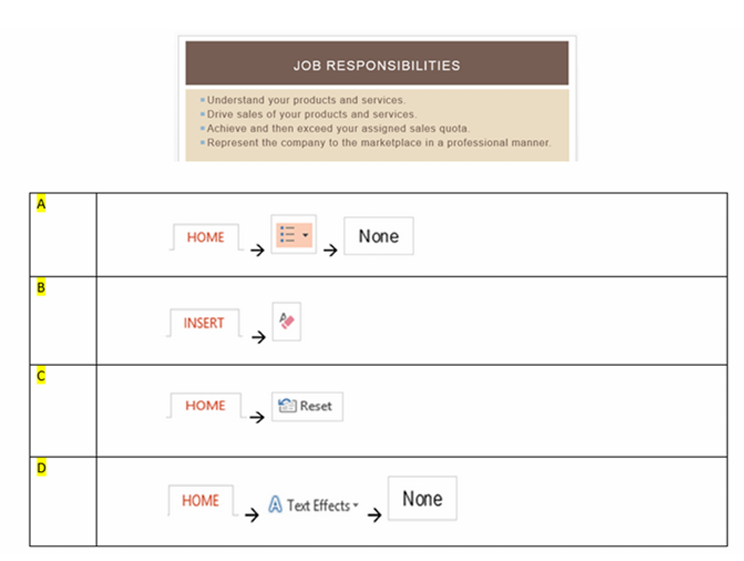
Q8. In the slide below, you would like to discontinue all bullets. How do you do this?
-
Question 9 of 40
9. Question
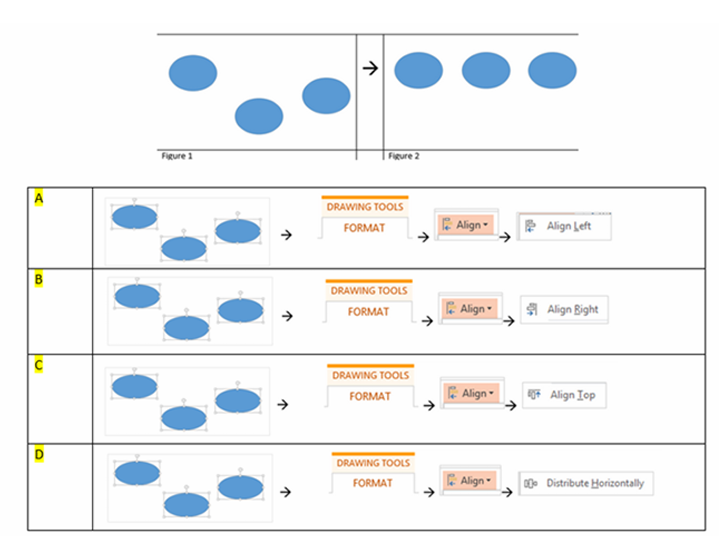
Q9. There are three oval shapes on slide as per Figure 1. How do you arrange the shapes horizontally as per Figure 2?
-
Question 10 of 40
10. Question
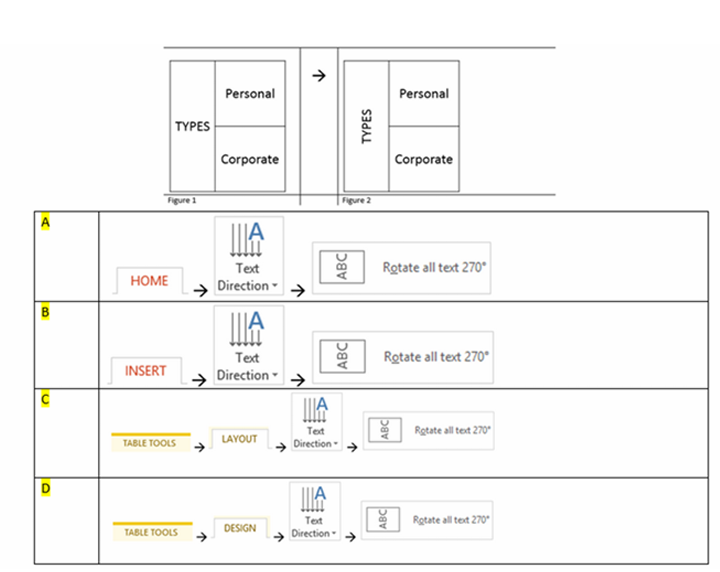
Q10. How do to you change the orientation of the word “”TYPES”” as shown in Figure 1 to what is depicted in Figure 2?
-
Question 11 of 40
11. Question
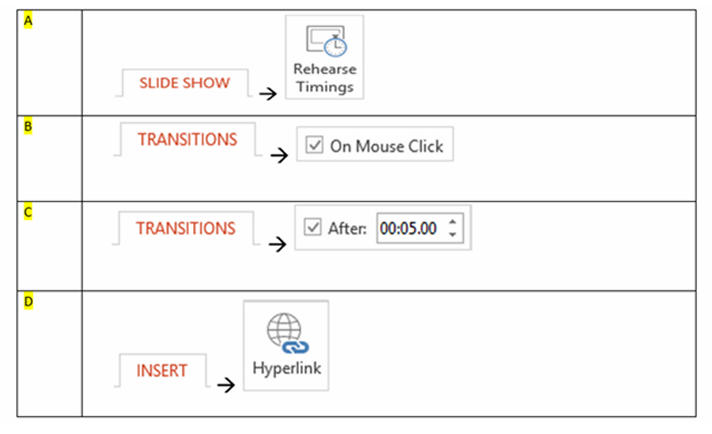
Q11. There are 15 slides in your presentation. The Slide Show must transit to the next slides automatically without pressing the “ENTER” key. How would you achieve that?
-
Question 12 of 40
12. Question
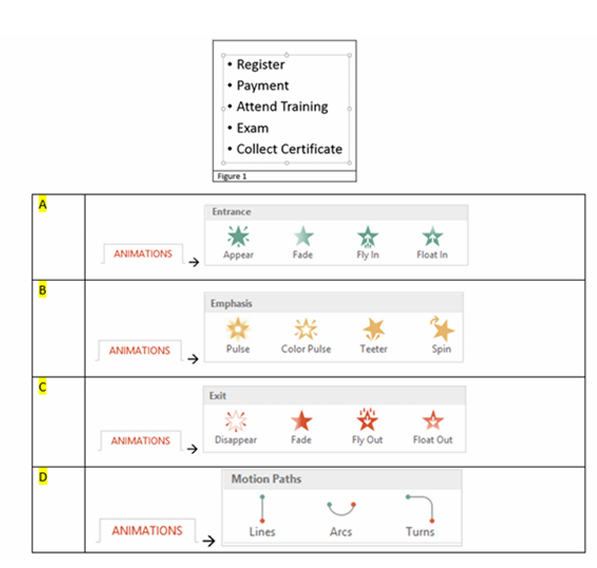
Q12. You want to animate the bulleted points in Figure 1. How do you apply animation effect, so that each bulleted point will appear one by one during a Slide Show?
-
Question 13 of 40
13. Question
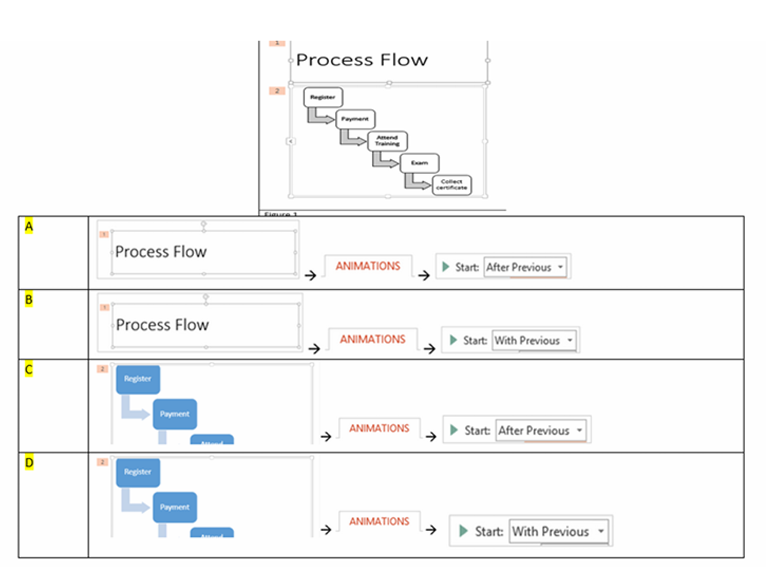
Q13. The slide in Figure 1 has been applied with animation. You would like object number 2, the “”Process Diagram”” to animate immediately after “”Title””. How do you achieve that?
-
Question 14 of 40
14. Question
Q14. Which method allows you to change your current SmartArt diagram to shapes that can be moved, resized or deleted independently?
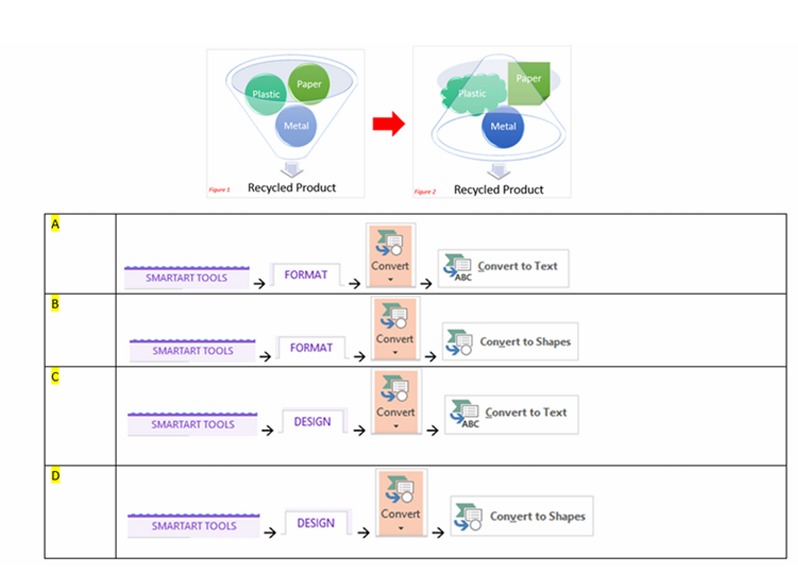
-
Question 15 of 40
15. Question
Q15. You have 50 photos in a folder. Which is the best method to insert all 50 photos into your presentation?
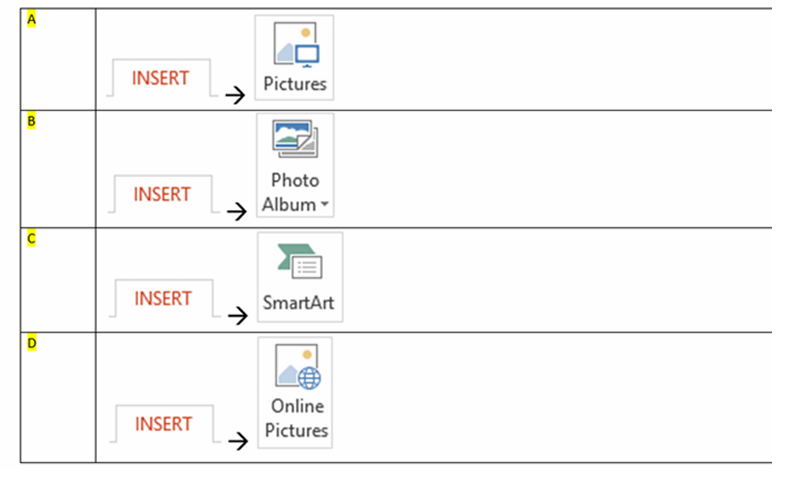
-
Question 16 of 40
16. Question
Q16. The table has 4 rows as shown in Figure 1. You would like to evenly distribute the height of every row as depicted in Figure 2. Which answer will achieve it?
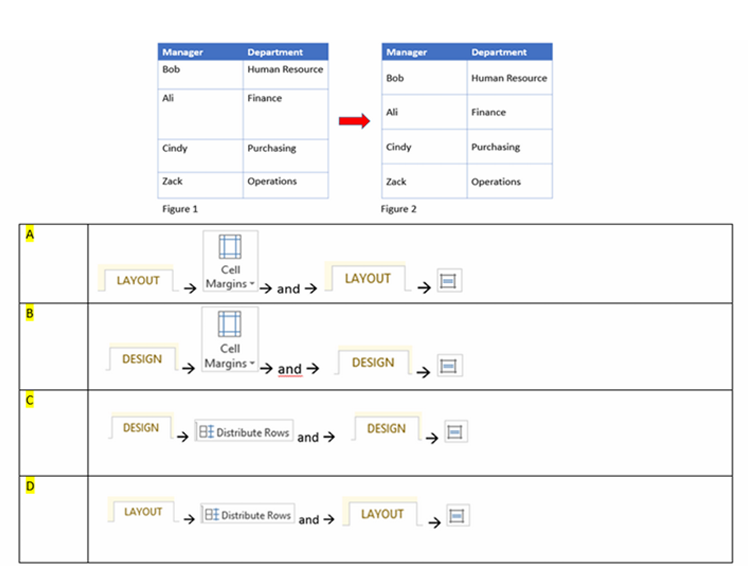
-
Question 17 of 40
17. Question
Q17. You have created a pie chart depicting training budget by departments in Figure 1. You would like to add a percentage of allocation to the pie chart as shown in Figure 2. You may select more than one answer.
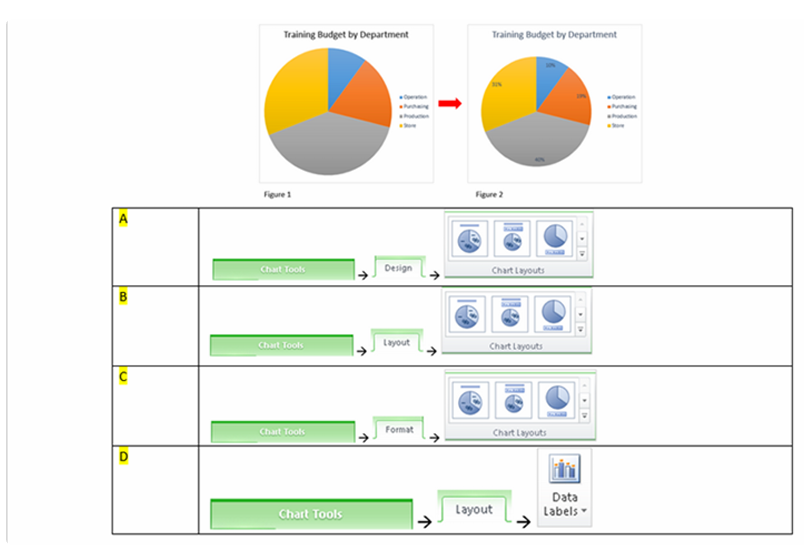
-
Question 18 of 40
18. Question
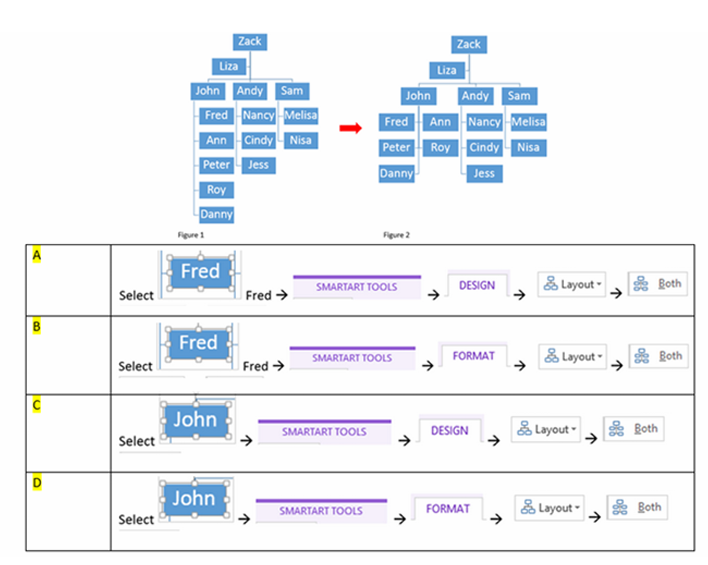
Q18. The organization chart shown in Figure 1, is biased heavy on the left side. You want to rearrange the subordinates under John as shown in Figure 2. How can you achieve this?
-
Question 19 of 40
19. Question
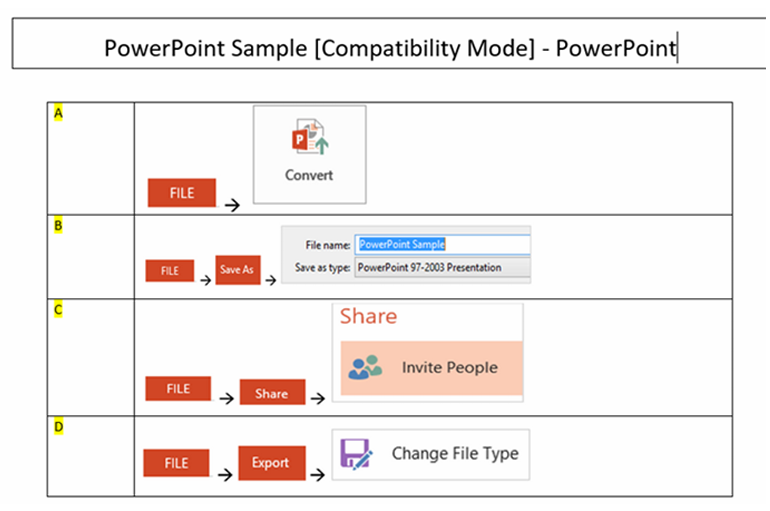
Q19. You need to share your presentation with users who are using lower than PowerPoint version 2010. How do you convert the file so that it becomes compatible for them to view and edit, with the label [Compatibility Mode] shown on the title bar?
-
Question 20 of 40
20. Question
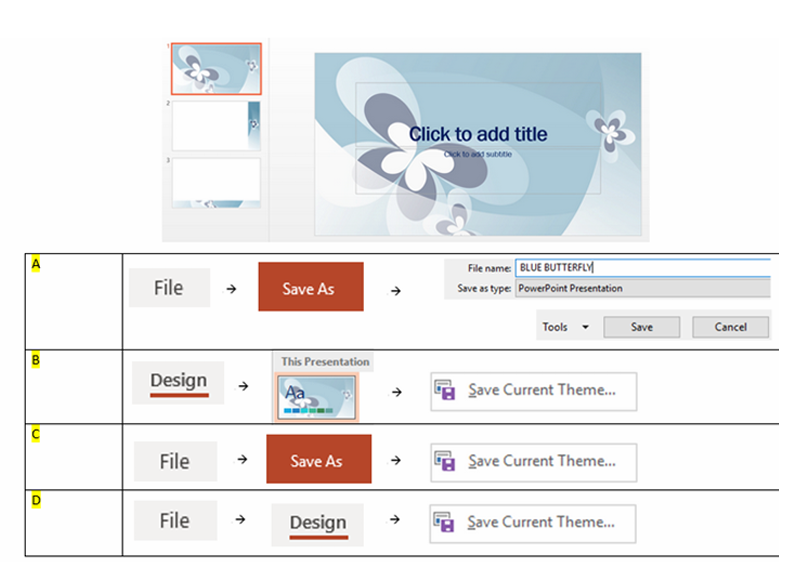
Q20. How do save this Blue Butterfly design, so that you can reuse in your other presentations?
-
Question 21 of 40
21. Question
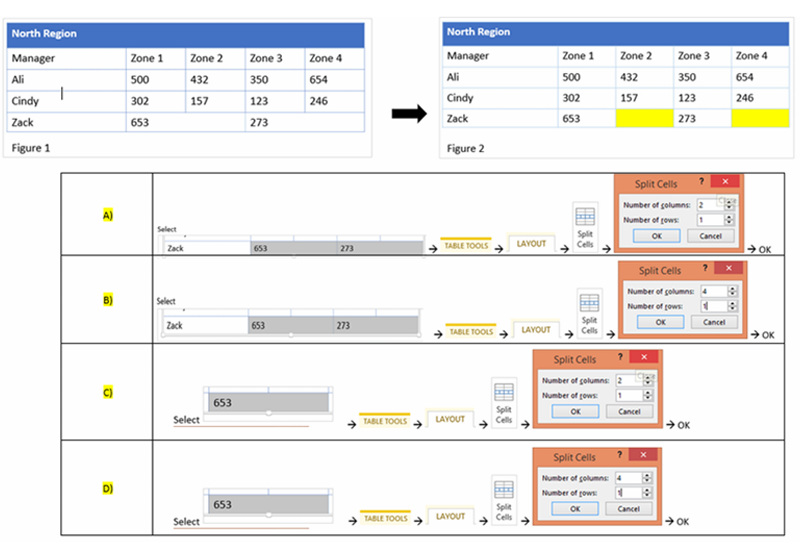
Q21. In Figure 1, you need to add two new zones for Zack. How do you insert the new zones as coloured in yellow shown in Figure 2?
-
Question 22 of 40
22. Question
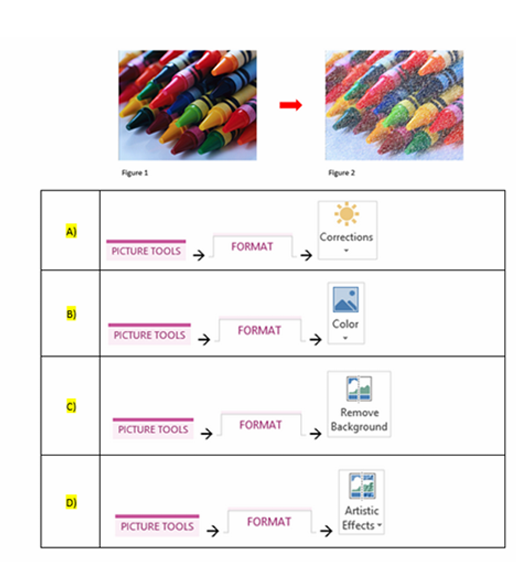
Q22. There is a picture effect applied to Figure 2. How do you apply the effect shown in Figure 1 to depict Figure 2?
-
Question 23 of 40
23. Question
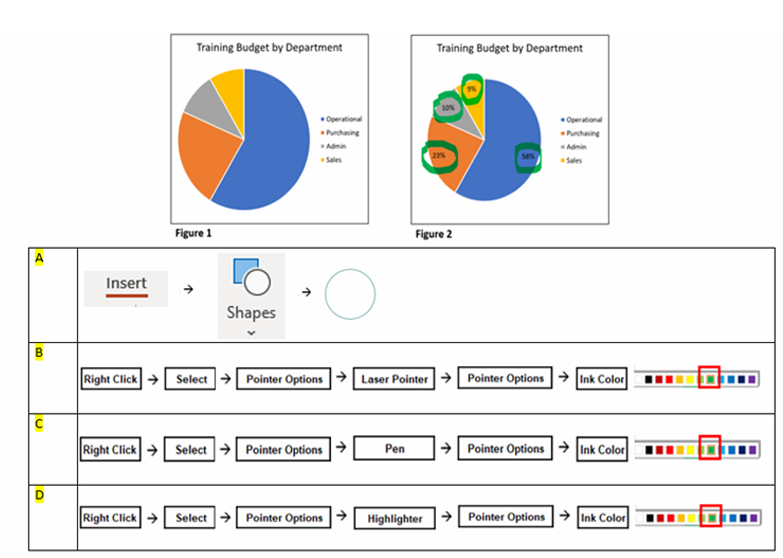
Q23. The slide show below is showing of the “Training Budget by Department”. How do you add the green circles as reflected in the picture below?
-
Question 24 of 40
24. Question
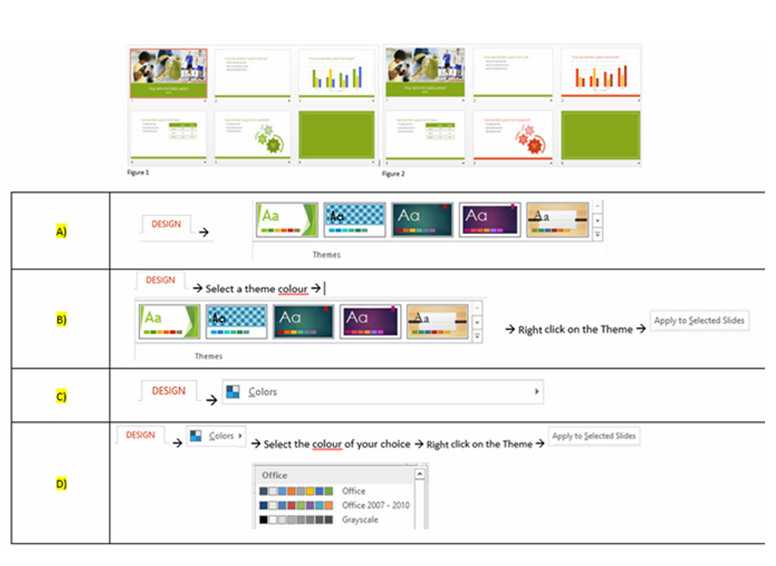
Q24. The six slides below in Figure 1, are using are using Green theme colour. How do you change the theme colour for few slide, as show in Figure 2?
-
Question 25 of 40
25. Question
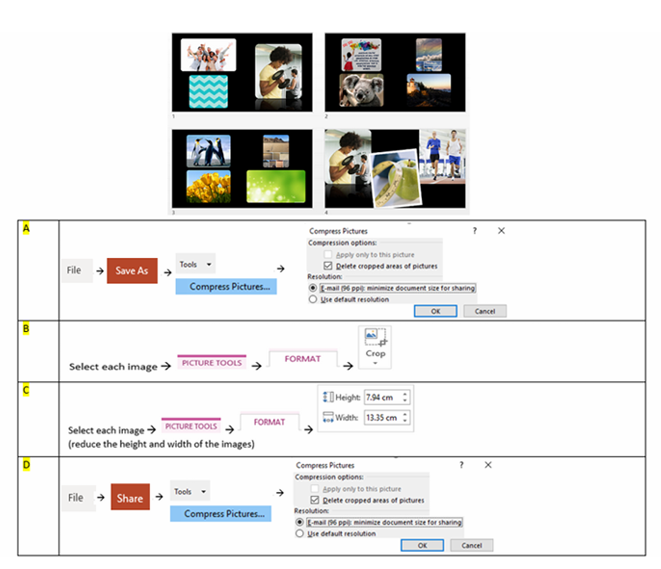
Q25. The presentation below contains images. You need to send this presentation to your colleague via email. You can’t send it, unless you reduce the size of the images. Which answer will be fastest method to achieve this?
-
Question 26 of 40
26. Question
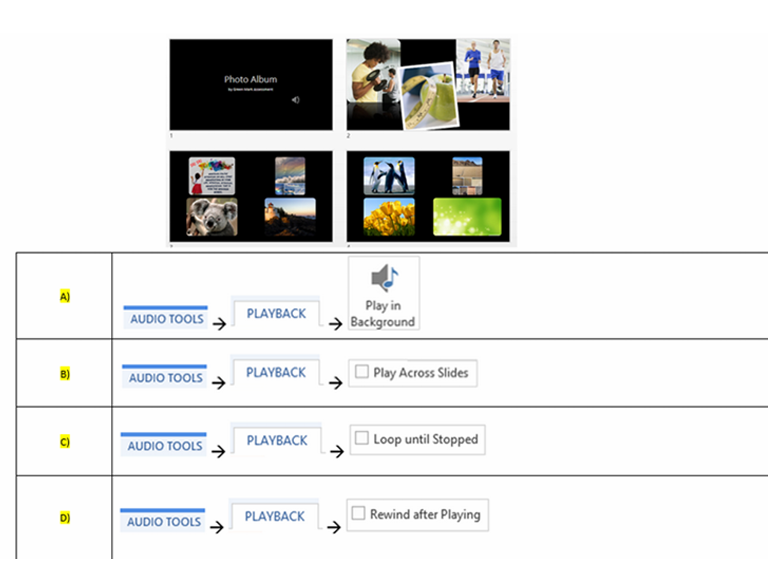
Q26. You have inserted an audio file into the first slide. You would like the audio to play continuously for all the slides in the presentation. How can this be achieved?
-
Question 27 of 40
27. Question
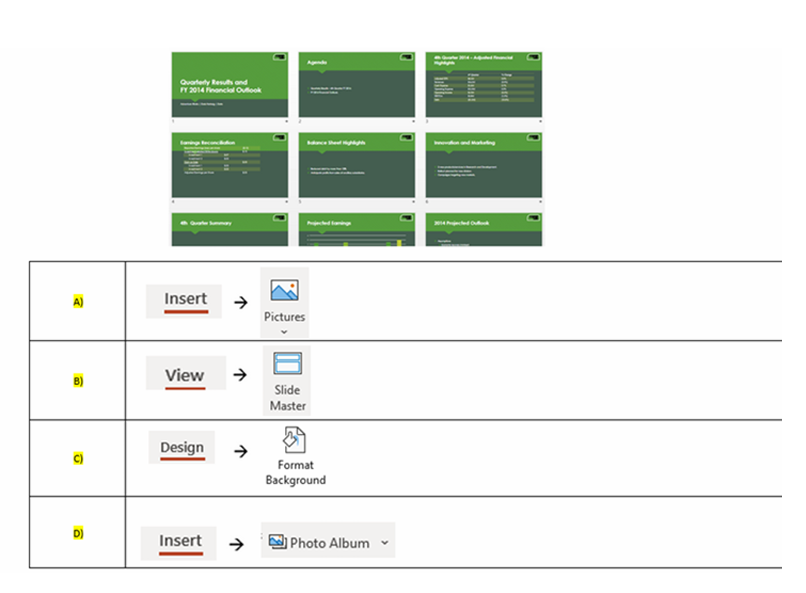
Q27. You prepared a 9 slides presentation. You would like to insert the company logo on the top right corner, for all the slides in the presentation. Which answer allow you to do this?
-
Question 28 of 40
28. Question
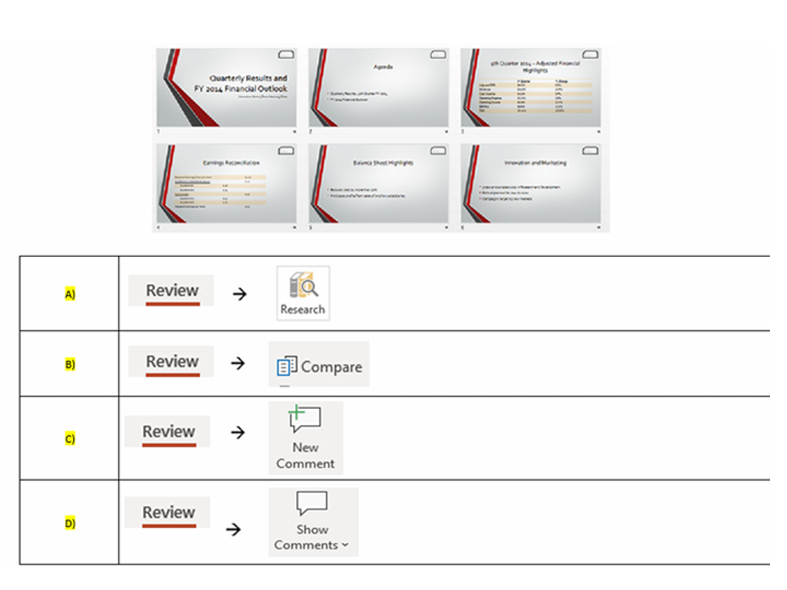
Q28. You have prepared your company’s annual report presentation. You would like your immediate superior to review your presentation. Which feature should your immediate superior use to notify you about the changes? How do you set this?
-
Question 29 of 40
29. Question
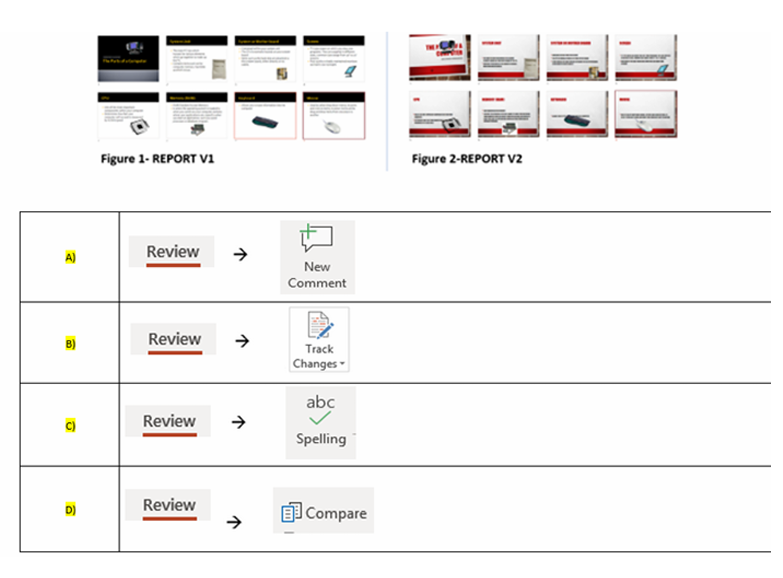
Q29. You have prepared your company’s quarterly report and it is save as “”REPORT V1″”. You would like your immediate superior to review your presentation. Your immediate superior has done some changes to the presentation and saved it as “”REPORT V2″”. You have likewise made some changes in the “”REPORT V1″” file. How do you reflect the final presentation with both changes in it?
-
Question 30 of 40
30. Question
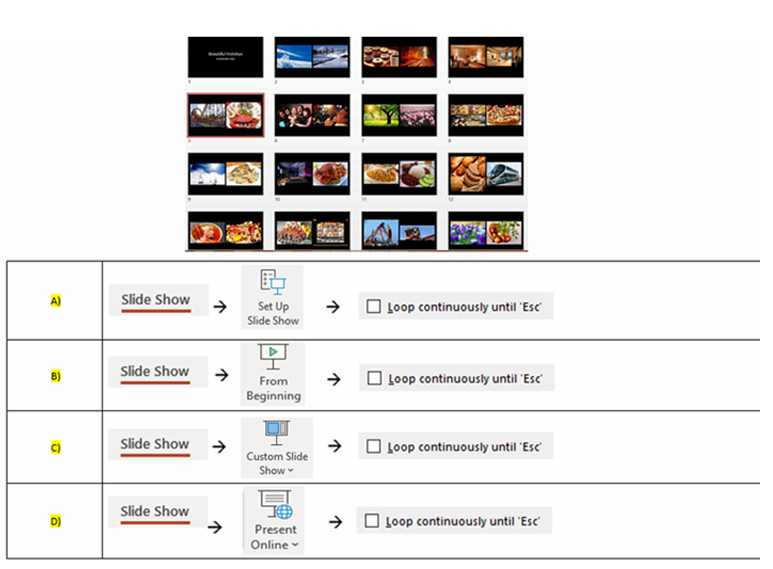
Q30. You are running a half day event. You want all your slides to play continuously. Which of the following answers allow you to achieve it?
-
Question 31 of 40
31. Question
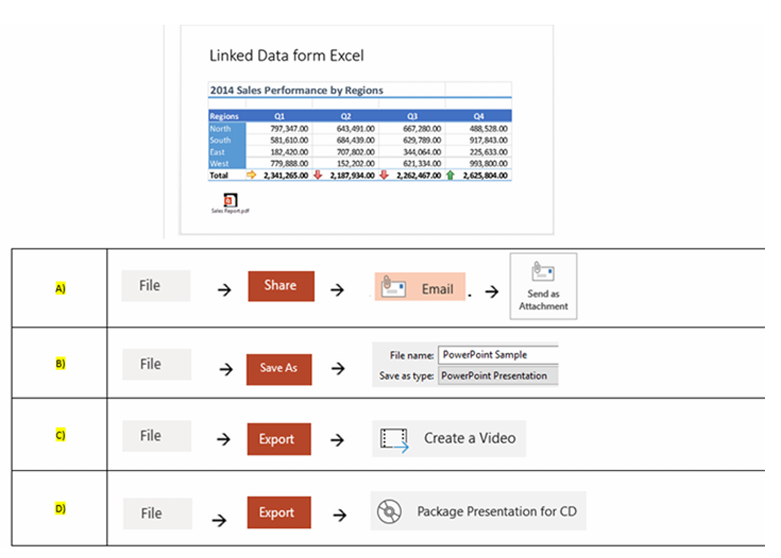
Q31. In your current presentation, there are links to Excel report and PDF file. To ensure that, all links are attached with your presentation. What is the best method to do this?
-
Question 32 of 40
32. Question
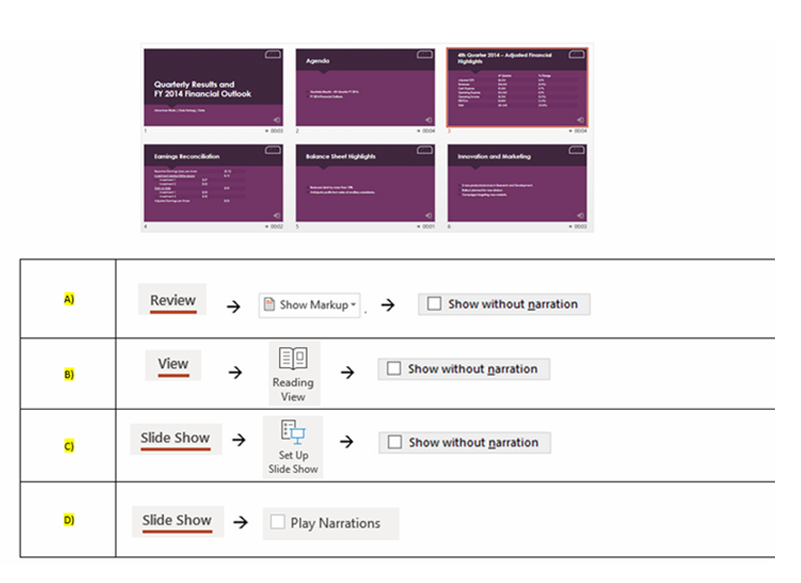
Q32. You have recorded a narration in the slides below. How do you start the Slide Show without the narration? You may select more than one answer.
-
Question 33 of 40
33. Question
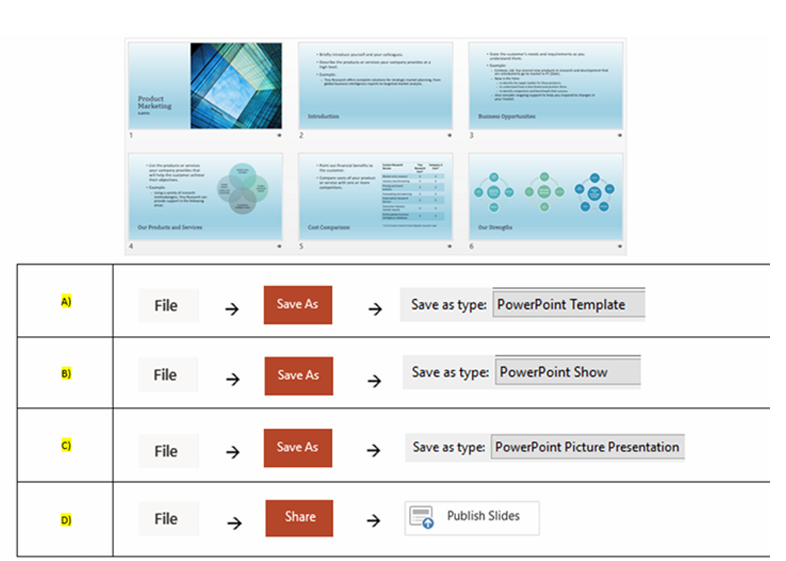
Q33. You have completed your “”Product Marketing”” presentation. You would like your presentation to run automatically, once it’s opened. How do you create this auto run slide show?
-
Question 34 of 40
34. Question
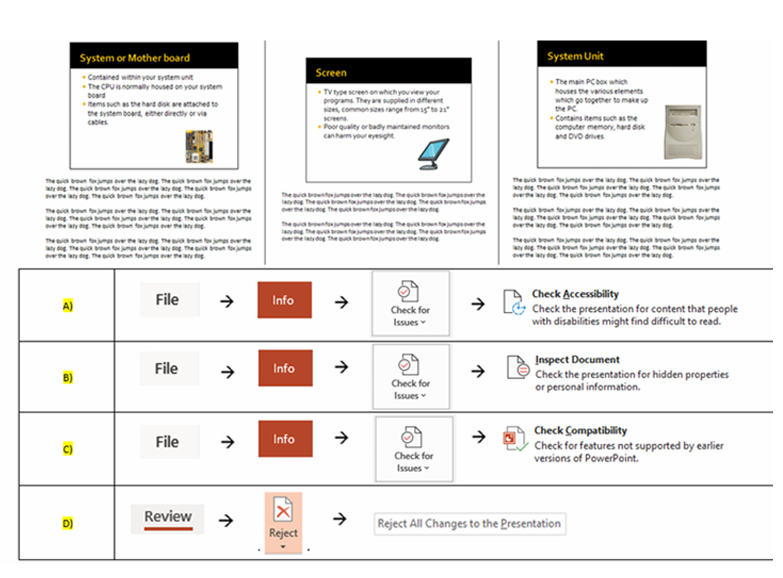
Q34. You have created the Company’s marketing presentation. Some of these slides contains notes. You would like to remove all the notes before sending it to your client. Which is answer is the fastest method to achieve it?
-
Question 35 of 40
35. Question
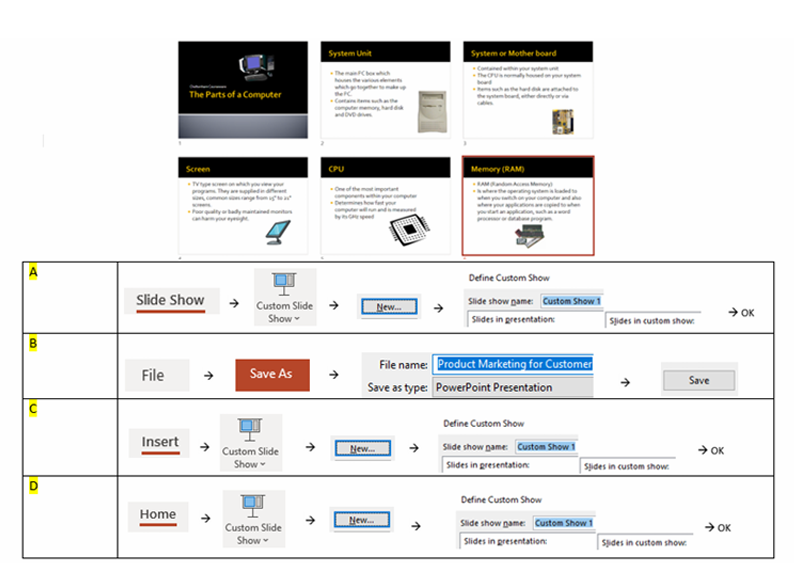
Q35. You have 6 slides for your Marketing presentation. You need to eliminate 2 slides from the current Marketing presentation for “”Customer”” group. How do you create the presentation for “”Customer”” group?
-
Question 36 of 40
36. Question
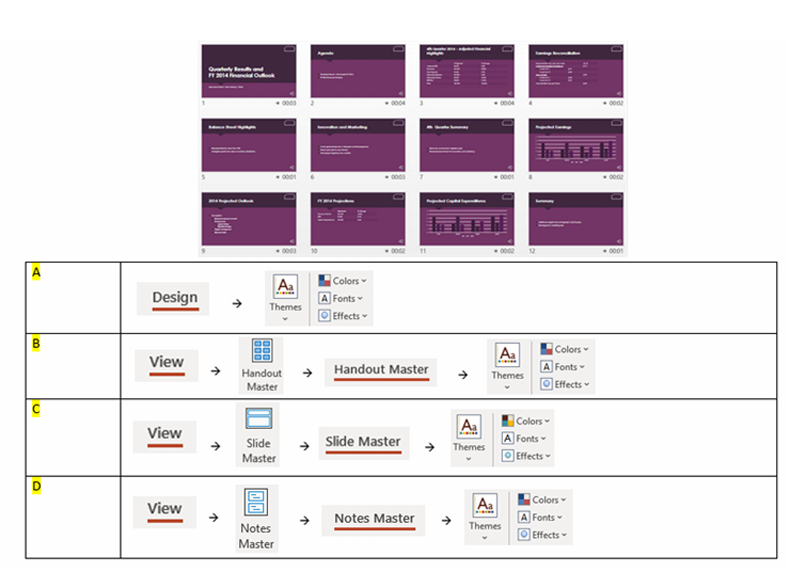
Q36. As the company’s presentation designer, you are asked to revamp the current Financial Report presentation with a new global corporate design and colour scheme. How do you do this?
-
Question 37 of 40
37. Question
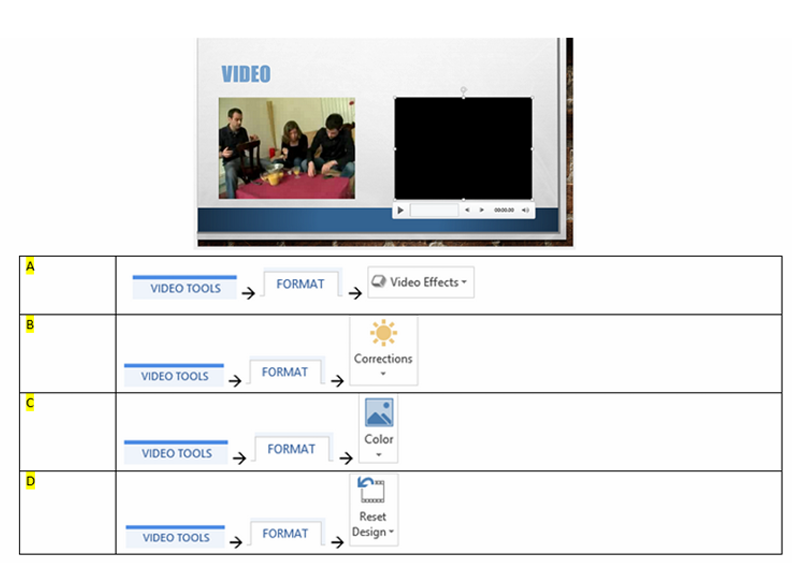
Q37. The current slide contains 2 videos. The video on the right appears darker. How do you brighten the second video?
-
Question 38 of 40
38. Question
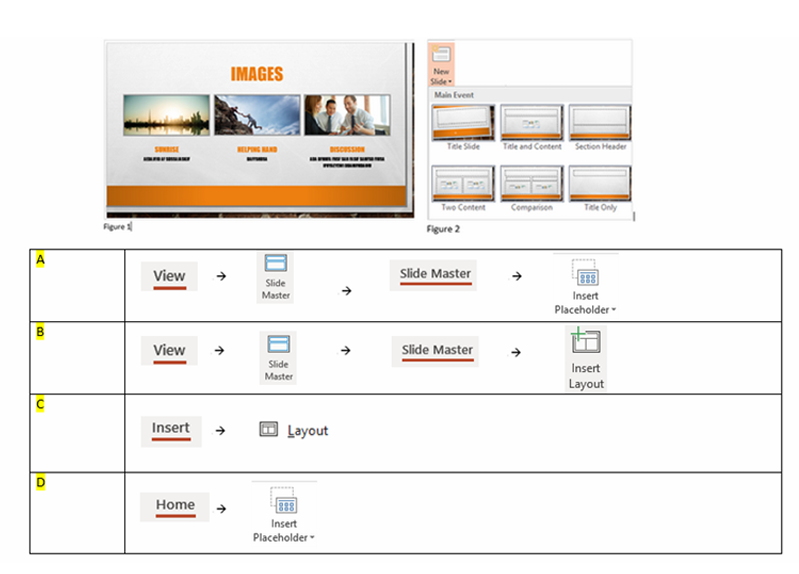
Q38. You would like to create new presentation layout (depicted in Figure 1) to be used globally in your presentation. So that the layout appears in the new slide drop down (depicted in Figure 2). Which of these answers allow you to do it?
-
Question 39 of 40
39. Question
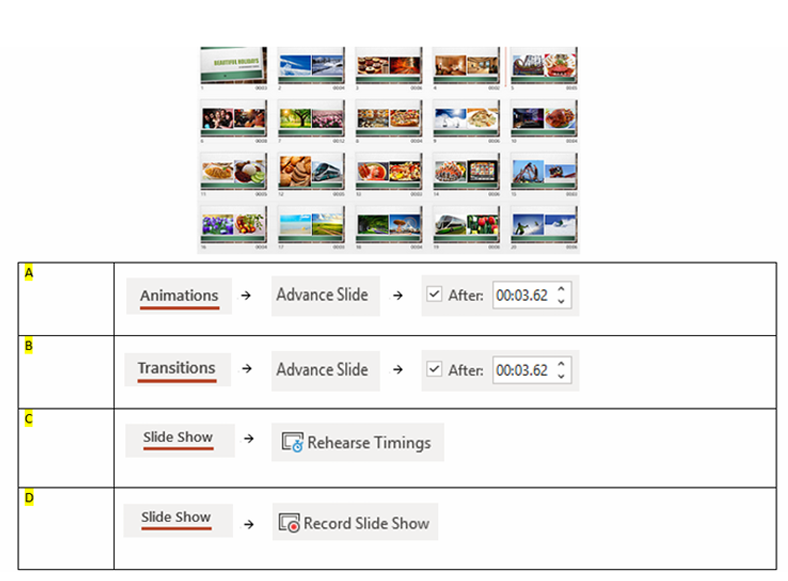
Q39. You would like you presentation to run automatically according to the timings shown below. How do add these different timing for each slide?
-
Question 40 of 40
40. Question
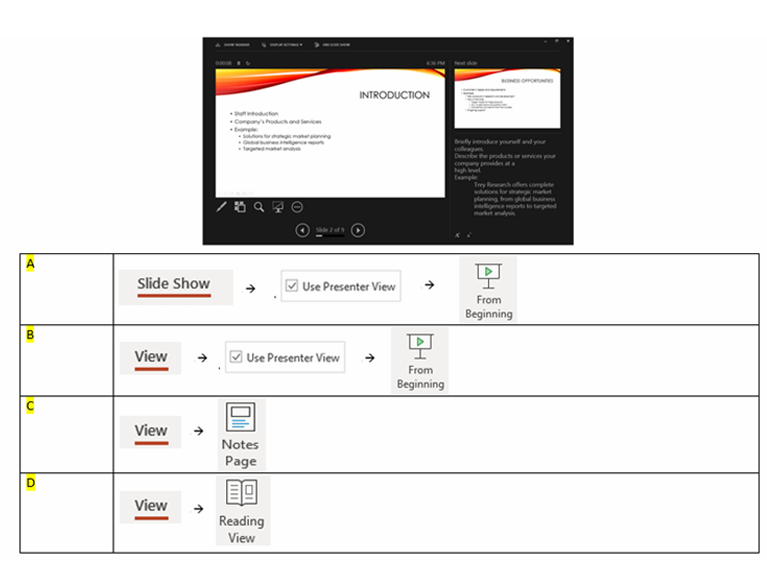
Q40. When running slide show, you would like to view your notes during presentation. How do you create the view as shown below?